Manual Geemarc TV-15 Remote Control

Need a manual for your Geemarc TV-15 Remote Control? Below you can view and download the PDF manual for free in English. This product currently has 6 frequently asked questions, 0 comments and has 0 votes. If this is not the manual you want, please contact us.

Is your product defective and the manual offers no solution? Go to a Repair Café for free repair services.

Manual

Loading…
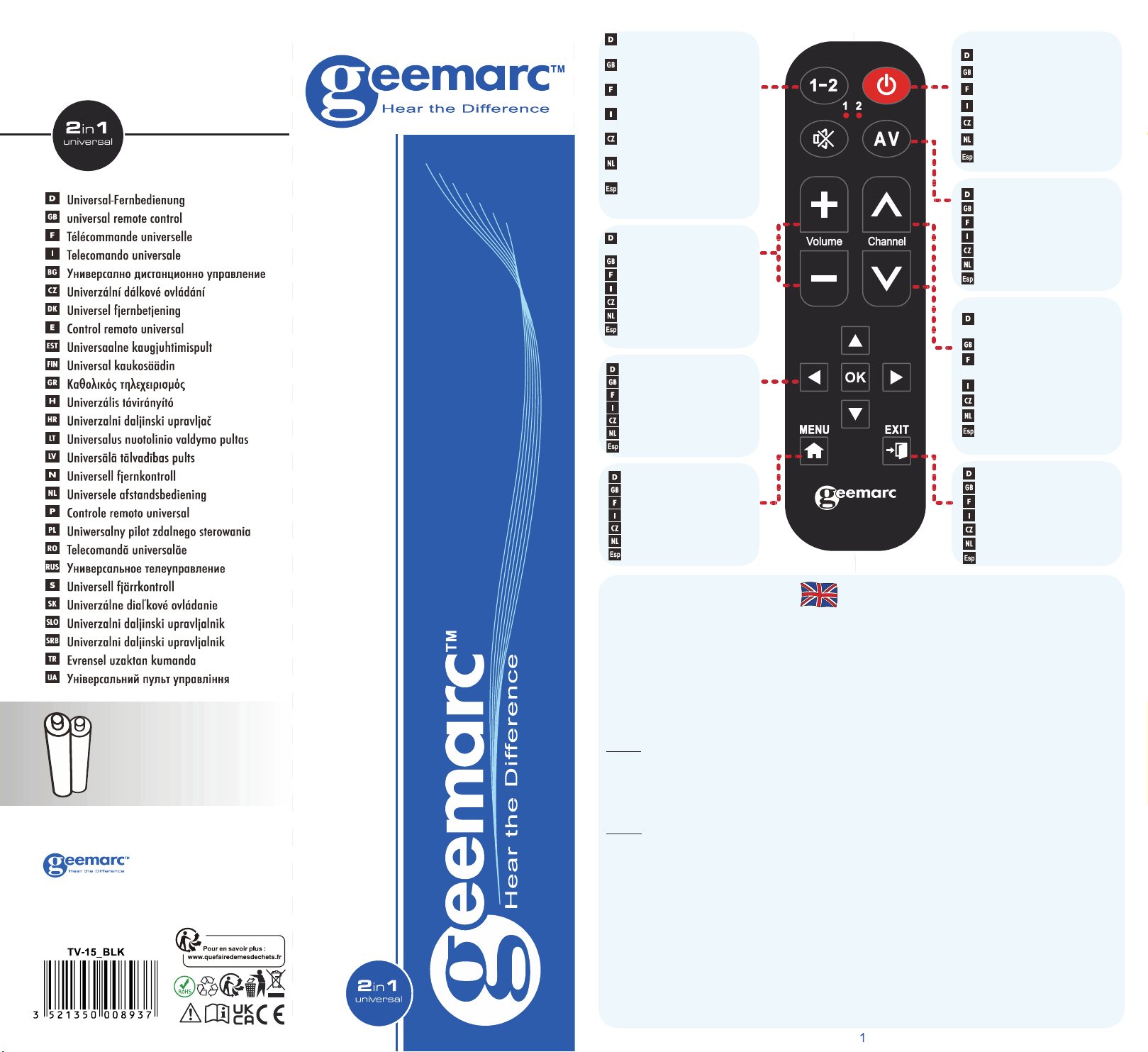
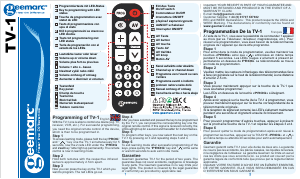
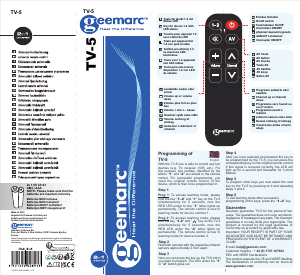
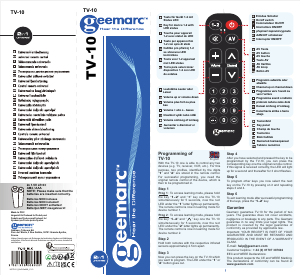
Ein/Aus Schalter
On/off switch
Commutateur On/Off
Interruttore ON/OFF
přepínač zapnuto/vypnuto
AAN/UIT schakelaar
Interruptor ON/OFF
AV Taste
AV button
AV touche
Tasto AV
AV tlačítko
AV knop
Botón AV
Lautstärke Lauter oder
Leiser
Volume up or volume down
Volume plus fort ou plus bas
Volume + alto o - basso
hlasitost vyšší nebo nižší
Volume omhoog of omlaag
Aumentar o disminuir el
volumen
Taste für Gerät 1-2 mit
Status LED
Key for device 1-2 with
LED status
Touche pour appareil 1-2
avec statut de LED
Tasto per apparecchio 1-2
con spia di stato
tlačítko pro přístroj 1-2 se
stavovou LED kontrolkou
Toets voor 1-2 apparaat
met LED status
Tecla para seleccionar
dispositivo 1-2 con LED
de estatus
Programm aufwärts oder
abwärts
Channel up or channel down
Programme vers l’avant ou
vers l’arrière
Programma avanti o indietro
probram nahoru nebo dolů
Kanaal omhoog of omlaag
Canal hacia arriba o hacia
abajo
EXIT Taste
EXIT button
Touche EXIT
Tasto EXIT
EXIT tlačítko
EXIT knop
Botón SALIR
Navigateur Taste
Navigator button
Touches de navigation
Navigator AV
Navigator tlačítko
Navigator knop
Botón del navegador
MENU Taste
MENU button
Touche MENU
Tasto MENU
MENU tlačítko
MENU knop
Botón de menú
TV-15
2x 1.5V LR 03
AM4 / AAA
NOTE: Please make sure that the
batteries are inserted correctly.
Batteries NON incluses
Batteries NON included!
Batterien NICHT enthalten!
Batterijen NIET meegeleverd!
Made In PRC
Hergestellt für/Produced for/Produit pour/
Prodotto per/Produce para/Produsert for/
Vyrobeno pro/Produs pentro/Gyartva:
Geemarc Télécom SA
Parc de l’Etoile, 2 Rue Galilée, 59791 Grande-Synthe,
France
Irrtümer, Abweichungen und Änderungen bei technischen Angaben und Abbildungen
vorbehalten. All technical data and illustrations are subject to errors, deviations &
modifications.
TV-15
Programming of
TV-15
With the TV-15 one is able to control any two
devices (e.g. TV, receiver, VCR, etc.). For this
purpose, two profiles, identified by the digits
1
” and “
2
” are stored in the remote control.
For successful programming, you need the
original remote control of the device, which is
then to be programmed in.
Step 1
Prog 1 : To access learning mode, please hold
the key “
1-2
” and “
+
” key one the TV-15
simultaneously for 5 seconds, now the red
LED under the “
1
” letter lights up permanently.
The remote control is now in learning mode for
device number 1.
Prog 2
: To access learning mode, please hold
the key “
1-2
” and “
” key one the TV-15
simultaneously for 5 seconds, now the red
LED under the “
2
” letter lights up permanently.
The remote control is now in learning mode for
device number 2.
Step 2
Hold both remotes with the respective infrared
sensors approximately 2.5cm apart.
Step 3
Now you can press the key on the TV-15 which
you want to program. The LED under the “
1
” or
2
” button goes out.
Step 4
After you have selected and pressed the key to be
programmed by the TV-15, you can press the
corresponding key one the original remote control.
If this signal is received correctly, the LED will light
up for a second and thereafter for 3 short flashes.
Step 5
To program other keys you now select the next
key on the TV-15 by pressing on it and repeating
steps 3 and 4.
Step 6
To exit learning mode after successful programming
of the keys, press the “
1-2
” key.
Garantee
Geemarc guarantee TV-15 for the period of two
years. The guarantee does not cover accidents,
negligence or breakage to any parts. The Geemarc
guarantee in no way limits your legal rights.
The product is covered by the legal guarantee
of conformity as provided by applicable law.
Important: YOUR RECEIPT IS PART OF YOUR
GUARANTEE AND MUST BE RETAINED AND
PRODUCED IN THE EVENT OF A WARRANTY
CLAIM.
Customer helpline : + 44 (0) 01707 387602
EEC and WEEE Declarations:
This product respects the CE and WEEE Marking.
The declarations of conformity can be found at
www.geemarc.com
TV-15
UGTV-15_EnFrGeItNL_V1.3
English
Download manual in English (PDF, 0.45 MB)
(Consider the environment and only print this manual if it is really necessary)

Loading…

Rating

Let us know what you think about the Geemarc TV-15 Remote Control by leaving a product rating. Want to share your experiences with this product or ask a question? Please leave a comment at the bottom of the page.
Are you satisfied with the Geemarc TV-15 Remote Control?
Yes No
Be the first to rate this product
0 votes

Join the conversation about this product

Here you can share what you think about the Geemarc TV-15 Remote Control. If you have a question, first carefully read the manual. Requesting a manual can be done by using our contact form.

More about this manual

We understand that it’s nice to have a paper manual for your Geemarc TV-15 Remote Control. You can always download the manual from our website and print it yourself. If you would like to have an original manual, we recommend you contact Geemarc. They might be able to provide an original manual. Are you looking for the manual of your Geemarc TV-15 Remote Control in a different language? Choose your preferred language on our homepage and search for the model number to see if we have it available.

Specifications

Brand Geemarc
Model TV-15
Category Remote Controls
File type PDF
File size 0.45 MB

All manuals for Geemarc Remote Controls
More manuals of Remote Controls

Frequently Asked Questions about Geemarc TV-15 Remote Control

Our support team searches for useful product information and answers to frequently asked questions. If you find an inaccuracy in our frequently asked questions, please let us know by using our contact form.

How do I connect a universal remote control to my television? Verified

To connect your universal remote control, you need the model number and brand name of both the remote control and the television. There is a list of codes for brands and model numbers in the manual of the remote control .

This was helpful (8004) Read more

Why are there letters next to the numbers on the remote control? Verified

Certain television settings may require you to enter letters. There are usually three letters or other characters on a button. When letter input is required, you can press that button once for the first letter, press twice for the second letter and press 3 times for the third letter. This way, text can be written with a minimum number of buttons.

This was helpful (683) Read more

Will my remote control also work on other television models of the same brand? Verified

Often a remote control of a television will also work on similar models of the same brand. However, it is unusual that it will work on all models of that brand. Universal remote controls are more suited to do this.

This was helpful (524) Read more

What is the average range of an infrared remote control? Verified

An average infrared remote control had a range of around 3 to 6 meters. Also, the further away the device is, the harder it will be to aim.

This was helpful (413) Read more

A battery in my device is oxidized, can I still safely use it? Verified

Ja, the device can still be safely used. Firstly, remove the oxidizd battery. Never use bare hands to do this. Then clean the battery compartment with a cotton swab dipped in vinegar or lemon juice. Let it dry and insert new batteries.

This was helpful (373) Read more

Can I leave a replacable battery in a device for a long time? Verified

Replacable batteries can remain in a device for a long time if the device is in use. When a device is being stored for a long time it is advisable to remove the batteries to prevent oxidation.

This was helpful (271) Read more
Manual Geemarc TV-15 Remote Control

Related products

Related categories

×
Download