4
Special notice
Thank you for choosing a GBC Binding Machine. We aim to produce
quality binding machines at an affordable price, with many advanced
features to enable you to create excellent results every time. Before
using your machine for the first time, please take a few minutes to read
through this guide.
Specifications
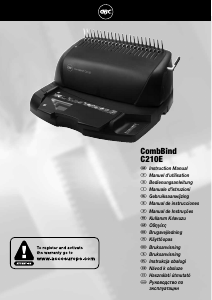
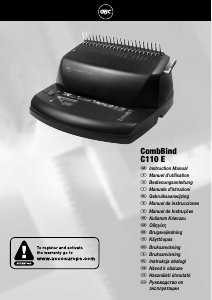
GBC CombBind C210E
297mm - A4
20 sheets (80gsm)
330 sheets
7.1 kg
220mm x 420mm x 384mm
Max. width of paper
Punching capacity, paper
Binding capacity
Net weight
Dimensions (H x W x D)
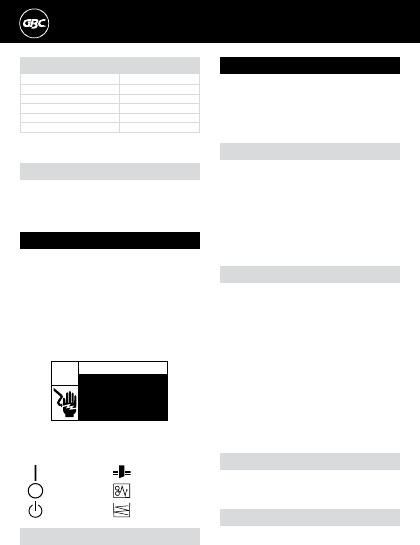
THIS WARNING IS FOUND ON THE PRODUCT.
Electrical shock hazard.
Do not open. No user
servicable parts inside.
Refer servicing to qualified
service personnel.
WARNING
m
c
This safety message means that you could be seriously hurt or killed if
you open the product and expose yourself to hazardous voltage.
THE SAFETY ALERT SYMBOL PRECEDES EACH SAFETY
MESSAGE IN THIS INSTRUCTION MANUAL.
THIS SYMBOL INDICATES A POTENTIAL PERSONAL
SAFETY HAZARD THAT COULD HURT YOU OR OTHERS,
AS WELL AS CAUSE PRODUCT DAMAGE OR PROPERTY
DAMAGE.
m
Safety instructions
YOUR SAFETY AS WELL AS THE SAFETY OF OTHERS IS IMPORTANT
TO ACCO BRANDS EUROPE. IN THIS INSTRUCTION MANUAL AND ON
THE PRODUCT ARE IMPORTANT SAFETY MESSAGES. READ THESE
MESSAGES CAREFULLY.
m
The following symbols appear on this product, and their meanings are
as follows:
Power Off Jam
Standby Chip Tray Full
Power On Punch Paper
General safeguards
• Use the CombBind C210E only for its intended purpose of
punching and binding paper and covers according to the indicated
specifications.
• Do not place anything in the punch opening of the machine other than
paper and cover stock.
• Place unit on a secure, stable work area to prevent the machine falling
and possibly causing personal injury and damage to the unit.
• Follow all warnings and instructions marked on the product.
• Lift the machine from the bottom, not the cover.
• Do not lift the machine by the cover or GuideRight™ edge guide.
FOR YOUR PROTECTION, DO NOT CONNECT THE
COMBBIND C210E TO ELECTRICAL POWER UNTIL YOU
READ THESE INSTRUCTIONS COMPLETELY. KEEP THESE
INSTRUCTIONS IN A CONVENIENT LOCATION FOR
FUTURE REFERENCE. TO GUARD AGAINST INJURY, THE
FOLLOWING BASIC SAFETY PRECAUTIONS MUST BE
OBSERVED IN THE SET-UP AND USE OF THIS PRODUCT.
m
Important safeguards
m
Electrical safeguards
• The CombBind C210E must be connected to a supply voltage
corresponding to the electrical rating of the machine as indicated on
the serial/rating plate or in this manual.
CAUTION: THE POWER RECEPTACLE MUST BE LOCATED
NEAR THE EQUIPMENT AND BE EASILY ACCESSIBLE.
• Unplug the CombBind C210E before moving it, or when it is not in use
for an extended period of time.
• Do not operate with a damaged supply cord or plug, after it
malfunctions, or after it has been damaged in any manner.
• Do not overload electrical outlets beyond their capacity as this can
result in fire or electrical shock.
• Do not alter attachment plug. Plug is configured for the appropriate
electrical supply.
• The unit is intended for indoor use only.
• Never push objects into this product through cabinet slots. Do not spill
liquid of any kind on this product.
• Do not operate if the product has been exposed to rain or water.
m
Service
• Do not attempt to service or repair the CombBind C210E yourself.
Unplug the unit and contact an authorised ACCO Brands Europe
service representative for any required repairs.
Caution: Unplug this product before cleaning.
• Wipe exterior only with a damp cloth. Do not use detergents
or solvents.
m
Cleaning
Please read these instructions carefully and keep
them in a safe place f or later reference.
Empty chip drawer
1
Your CombBind C210E has a chip drawer located on the right side
of the machine (fig.8). When it is full, an indicator light located above
the punch button will illuminate. To empty, gently pull the drawer
open and remove it from the machine. Dispose of the contents and
re-insert the drawer into the machine until it snaps in place.


Join the conversation about this product
Here you can share what you think about the GBC CombBind C210E Binding Machine. If you have a question, first carefully read the manual. Requesting a manual can be done by using our contact form.