Manual Furrion FUTVRS1-BL Remote Control

Need a manual for your Furrion FUTVRS1-BL Remote Control? Below you can view and download the PDF manual for free in English. This product currently has 6 frequently asked questions, 12 comments and has 21 votes with an average product rating of 5/100. If this is not the manual you want, please contact us.

Is your product defective and the manual offers no solution? Go to a Repair Café for free repair services.

Manual

Loading…
11
10
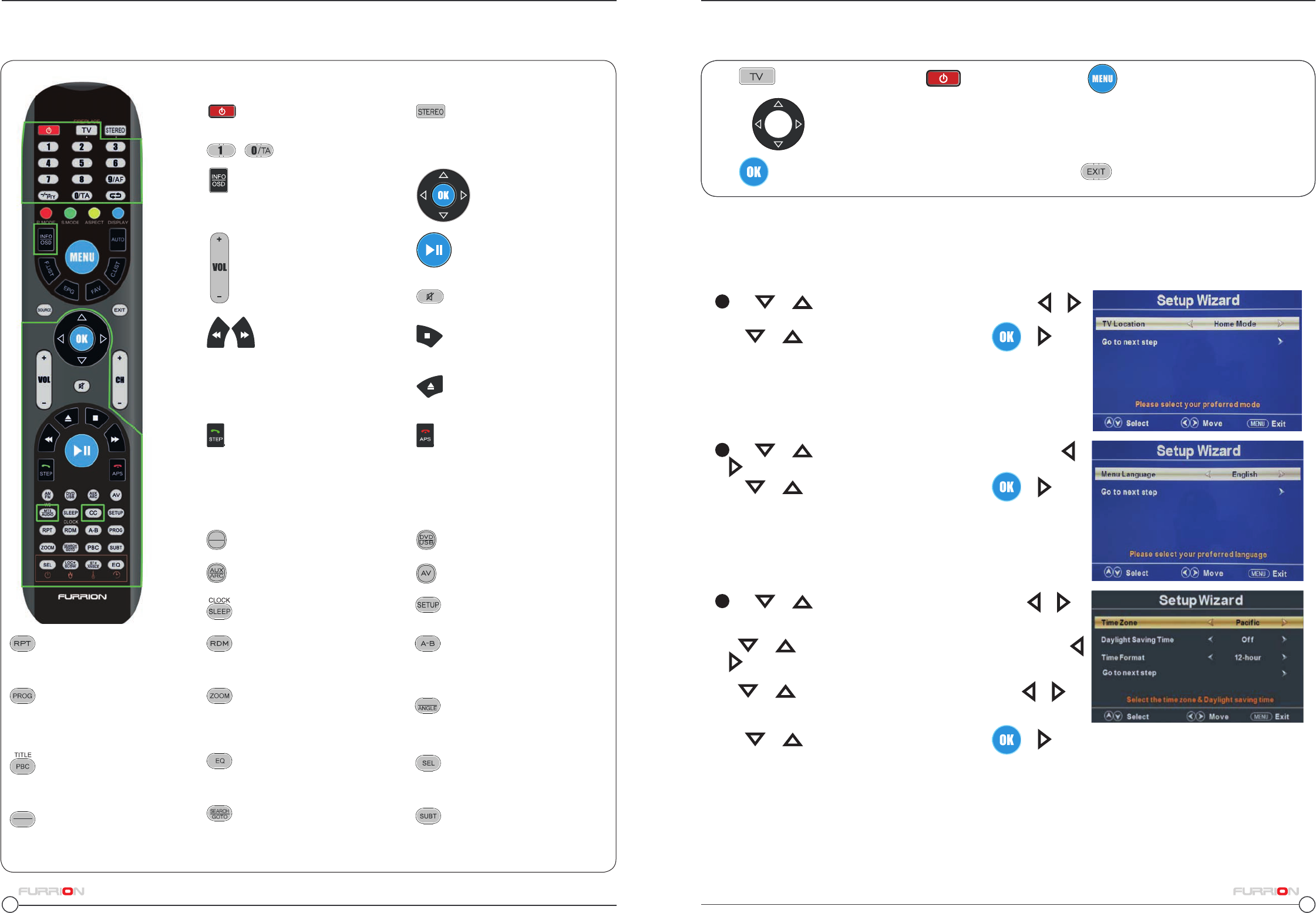
The Furrion Unismart
TM
remote control allows control of other Furrion systems
Set Up
Using the Menu
Controls
11
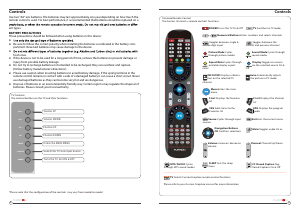
AM/FM Selects AM/FM/WB
Radio
Play/ Pause Starts, Pauses
or restarts Playback
Eject Ejects DVD/ CD
Stop Stops playback
Previous/ Next:
Press during playback
to select the previous or
next track/ chapter. Press and hold
to fastforward or rewind.
Automatic or Manual tuning in
radio mode
Step Press to forward frame
by frame during DVD/ VCD
playback.
Dial or Accept a call (when the sys-
tem is connected to a cell phone)
APS Press to scan radio
stations: A brief press searches
through each stored station. Press
& hold to scan and store the 6
strongest stations.
End or Reject a call (when the sys-
tem is connected to a cell phone)
AV Selects AV Mode
AUX/ ARC Selects AUX/ ARC
Mode
CLOCK Displays and sets
the time
RPT Press to select repeat-
playback modes.
A-B Press to start the A-B
repeat function (playback loop of a
segment of track)
ZOOM Press to enlarge screen
images.
TITLE/ PBC Displays DVD/
VCD Title lists/ Toggles
PBC (Play Back Control) on & off.
SEL Toggles between
Volume, Bass, Treble & Balance;
Hours & Minutes for adjusting.
SEARCH/ GOTO Jumps to a
specific time on a DVD/VCD/MP3/
WMA or CD.
SETUP Enters the Setup menu
for the entertainment system
RDM Toggles random playback-
mode on & off.
PROG Used to start the
programmed playback function.
ST/ ANGLE Toggles Stereo &
Mono sound/ switches
viewing angles on compatible
media.
EQ Toggles the sound mode
Cinema, Rock, Classic & Flat.
LOC/ SLOW Toggles
radio reception strength/
Press to start slow motion play-
back.
SUBT Press to display
subtitles on compatible media.
Repeatedly press to cycle through
subtitle options.
INFO/OSD Displays DVD
playback status
- Numerical Buttons Enters numbers and selects channels
STEREO Switches to Stereo
mode
Volume Increases/ decreases
volume
Navigation Buttons
OK Confirms selections
Mute Toggles audio On or O
DVD/USB Selects DVD/USB
Button Functions when the remote control is in Stereo Mode
POWER Turns the Entertain-
ment System On & Off
Setup Wizard
The first time the TV is turned on, the SETUP WIZARD will start. The wizard will assist in configuring the TV for
use. and scan for available channels.
1
Use or keys to highlight TV Location, then press or
to select Home Mode or Retail Mode.
Press
or to highlight Go to next step, press or to go
to the next step.
2
Use or keys to highlight Menu Language, then press
or to select the desired language.
Press
or to highlight Go to next step, press or to go
to the next step.
3
Use or keys to highlight Time Zone then press or to
select the desired timezone.
Use
or keys to highlight Daylight Saving Time then press
or to select On or Off.
Use
or keys to highlight Time Format then press or to
select 12-hour or 24-hour.
Press
or to highlight Go to next step, press or to go
to the next step.
Press
to select TV Mode and then to turn on the TV. Press to enter the menu.
Use the
keys to navigate the menus and to select settings.
Press to confirm selections & setting and enter sub menus Press at any time to exit the menu.
LOC*
SLOW
ST#
AM
FM
Download manual in English (PDF, 2.12 MB)
(Consider the environment and only print this manual if it is really necessary)

Loading…

Rating

Let us know what you think about the Furrion FUTVRS1-BL Remote Control by leaving a product rating. Want to share your experiences with this product or ask a question? Please leave a comment at the bottom of the page.
Are you satisfied with the Furrion FUTVRS1-BL Remote Control?
Yes No
5%
95%
21 votes

Join the conversation about this product

Here you can share what you think about the Furrion FUTVRS1-BL Remote Control. If you have a question, first carefully read the manual. Requesting a manual can be done by using our contact form.

Marc Connelly 26-02-2022
how does the remote control the fire place?

reply | This was helpful (12)
Greg 02-12-2021
The remote works fine with the TV, but cannot get it to work with the DVD player.

reply | This was helpful (8)
Anita West 28-03-2019
How do you "un-zoom" The picture is to big and chops off the top of everyones head

reply | This was helpful (4) Read more
Manuall 28-03-2019
This is probably because the aspect ratio has changed. This can be adjusted in the settings menu of the television.

This was helpful (2)
Greg 07-11-2021
How do I turn on/off CC. This manual has a CC button where my remote has a ’Freeze’ button. And the picture freezes when pressed. Are there two versions of this remote? Mine is labelled P/N FUTVRS1-BL

reply | This was helpful (4)
Scott Law 09-11-2023
When I press TV and then power on my Furrion Unimote1 remote (p/n FUTVRS1-bl) the TV says "sleep timer" so it's not connected right. My TV is a Furrion though so it should just work, but nothing on the remote matches the TV

reply | This was helpful (2)

Loading…

Dizz 09-12-2019
How do I get my DVD out now I have watched it?

reply | This was helpful (1)
Dian 30-04-2022
How do I get to netflex on furrion remote

reply | This was helpful (1)
C woody 18-11-2023
Remote stopped working tv?

reply | This was helpful (1)
co 11-07-2022
How do I change to English from Spanish?

reply | This was helpful (0)
Ken Holloway 13-08-2023
Will this remote work with the Furrion DV7200 Entertainment System?

reply | This was helpful (0)
Sandy 17-01-2024
How do I bring up the apps

reply | This was helpful (0)

More about this manual

We understand that it’s nice to have a paper manual for your Furrion FUTVRS1-BL Remote Control. You can always download the manual from our website and print it yourself. If you would like to have an original manual, we recommend you contact Furrion. They might be able to provide an original manual. Are you looking for the manual of your Furrion FUTVRS1-BL Remote Control in a different language? Choose your preferred language on our homepage and search for the model number to see if we have it available.

Specifications

Brand Furrion
Model FUTVRS1-BL
Category Remote Controls
File type PDF
File size 2.12 MB

All manuals for Furrion Remote Controls
More manuals of Remote Controls

Frequently Asked Questions about Furrion FUTVRS1-BL Remote Control

Our support team searches for useful product information and answers to frequently asked questions. If you find an inaccuracy in our frequently asked questions, please let us know by using our contact form.

How do I connect a universal remote control to my television? Verified

To connect your universal remote control, you need the model number and brand name of both the remote control and the television. There is a list of codes for brands and model numbers in the manual of the remote control .

This was helpful (7993) Read more

Why are there letters next to the numbers on the remote control? Verified

Certain television settings may require you to enter letters. There are usually three letters or other characters on a button. When letter input is required, you can press that button once for the first letter, press twice for the second letter and press 3 times for the third letter. This way, text can be written with a minimum number of buttons.

This was helpful (682) Read more

Will my remote control also work on other television models of the same brand? Verified

Often a remote control of a television will also work on similar models of the same brand. However, it is unusual that it will work on all models of that brand. Universal remote controls are more suited to do this.

This was helpful (524) Read more

What is the average range of an infrared remote control? Verified

An average infrared remote control had a range of around 3 to 6 meters. Also, the further away the device is, the harder it will be to aim.

This was helpful (412) Read more

A battery in my device is oxidized, can I still safely use it? Verified

Ja, the device can still be safely used. Firstly, remove the oxidizd battery. Never use bare hands to do this. Then clean the battery compartment with a cotton swab dipped in vinegar or lemon juice. Let it dry and insert new batteries.

This was helpful (371) Read more

Can I leave a replacable battery in a device for a long time? Verified

Replacable batteries can remain in a device for a long time if the device is in use. When a device is being stored for a long time it is advisable to remove the batteries to prevent oxidation.

This was helpful (271) Read more
Manual Furrion FUTVRS1-BL Remote Control

Related products

Related categories

×
Download