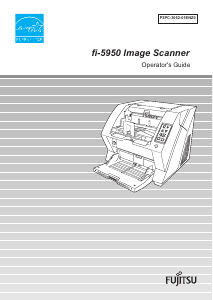
Manual Fujitsu fi-5950 Scanner

Need a manual for your Fujitsu fi-5950 Scanner? Below you can view and download the PDF manual for free in English. This product currently has 1 frequently asked question, 0 comments and has 0 votes. If this is not the manual you want, please contact us.

Is your product defective and the manual offers no solution? Go to a Repair Café for free repair services.

Manual

Loading…

i
Thank you for purchasing the fi-5950 Image Scanner.
The fi-5950 is an image scanner designed to scan various documents in large quantities.
The fi-5950 has the following features.
Improvement of color scanning speed (105 sheets or 210 pages
per minute) with high resolution (300dpi)
By the newly-developed high speed CCD and high speed image processing circuit,
scanning speed (A4 color, 300dpi) of 105 sheets/210 pages per minute) is improved.
Now you can scan a large amount of documents which is about 100,000 sheets a day!
Efficient pre-processing and post-processing!
This scanner is able to scan mixed documents stables of papers of different color,
density, size and thickness. This makes the scanning process even simpler and
economic, since you no not have to sort out the documents before scanning any more!
Furthermore, this scanner is equipped with an "Elevator" Stacker, moving
automatically into the appropriate height, according to the amount of loaded
documents. This will make the documents be easily and elegantly handled and also
increases your scanning efficiency!
Prevention of data loss because of improved multi feed detection
This scanner is equipped with ultrasonic multi feed detection sensors, which detect
reliably the feeding of 2 or more documents together into the scanner. Those multi
feed can also be detected surely, when scanning documents of different thickness,
size, color or density. This will help you to increase your efficiency, since the data loss
caused by multi feed is detected immediately. This gives you the opportunity to
correct the scanning without too much troubles and loss of time.
High image processing function
The automatic detection function of this scanner is able to detect if the loaded
documents are color or monochrome and according to the detection the appropriate
settings will be automatically chosen for the image creation. Since the scanner does
this automatically, you do not have to set the image settings each time before
scanning. Furthermore, The Kofax VRS image processing board is installed as
standard equipment for this scanner. This VRS board which has a good reputation for
image processing on a high level, enables you to create images of high quality and
provides advanced functions like the "Automatic direction correction" and
"Background equalization function".
INTRODUCTION
Download manual in English (PDF, 8.15 MB)
(Consider the environment and only print this manual if it is really necessary)

Loading…

Rating

Let us know what you think about the Fujitsu fi-5950 Scanner by leaving a product rating. Want to share your experiences with this product or ask a question? Please leave a comment at the bottom of the page.
Are you satisfied with the Fujitsu fi-5950 Scanner?
Yes No
Be the first to rate this product
0 votes

Join the conversation about this product

Here you can share what you think about the Fujitsu fi-5950 Scanner. If you have a question, first carefully read the manual. Requesting a manual can be done by using our contact form.

More about this manual

We understand that it’s nice to have a paper manual for your Fujitsu fi-5950 Scanner. You can always download the manual from our website and print it yourself. If you would like to have an original manual, we recommend you contact Fujitsu. They might be able to provide an original manual. Are you looking for the manual of your Fujitsu fi-5950 Scanner in a different language? Choose your preferred language on our homepage and search for the model number to see if we have it available.

Specifications

Brand Fujitsu
Model fi-5950
Category Scanners
File type PDF
File size 8.15 MB

All manuals for Fujitsu Scanners
More manuals of Scanners

Frequently Asked Questions about Fujitsu fi-5950 Scanner

Our support team searches for useful product information and answers to frequently asked questions. If you find an inaccuracy in our frequently asked questions, please let us know by using our contact form.

What does DPI stand for? Verified

DPI stands for Dots Per Inch and indicates how sharp scans will be. More DPI results in sharper scans.

This was helpful (24) Read more
Manual Fujitsu fi-5950 Scanner

Related products

Related categories

×
Download