IMPORTANT!
• This product is not intended to be used as a medical monitor
and its use should not replace adult supervision.
• Test sound reception of receiver before first-time use and
whenever you change location of the transmitter.
• To prevent entanglement:
- Never place transmitter in a crib or playpen. Keep transmitter
and receiver out of baby’s reach.
- Never use extension cords with AC adaptors.
• Never use transmitter, receiver or AC adaptors near water
(ie.: bathtub, sink, laundry tub or wet basement, etc.).
• Always use transmitter, receiver and AC adaptors where there is
adequate ventilation. To prevent overheating, keep transmitter,
receiver and AC adaptors away from heat sources such as
radiators, heat registers, direct sunlight, stoves, amplifiers, or
other appliances which produce hear.
CAUTION
• This product cannot replace responsible
adult supervision.
• Please keep small parts out of children’s
reach. Dispose of dead “AAA” batteries
properly.
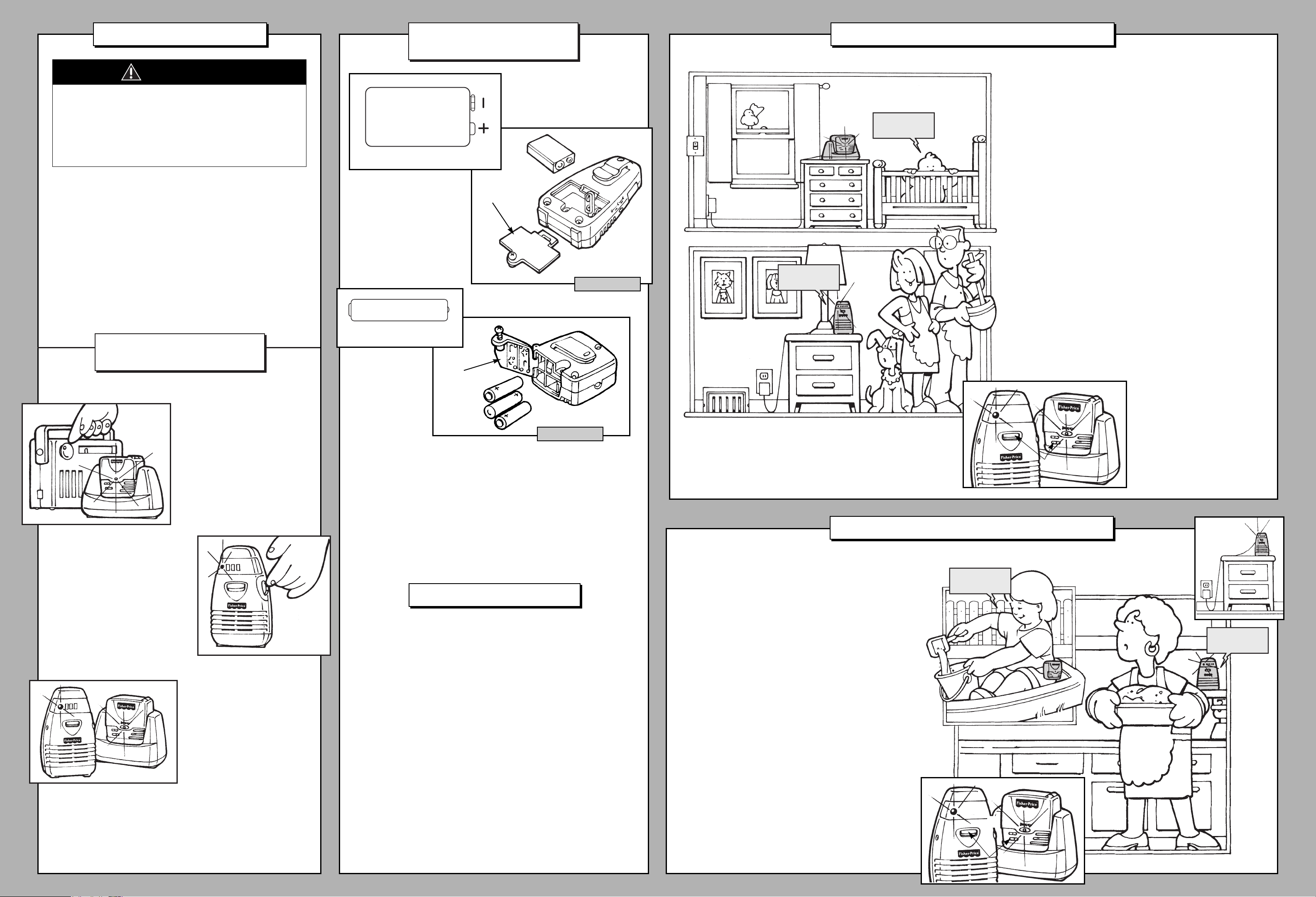
TESTING
SOUND RECEPTION
For use with baby, place trans-
mitter in room in which you
intend to use it. Slide transmitter
power switch to turn on. Turn on
a radio.
For use with toddler, have tod-
dler stand in the area in which
they will be playing. Slide trans-
mitter power switch to turn on.
Ask child to speak.
For use with baby, place receiver in
room in which you intend to use it.
Rotate on/off/volume dial to turn
power on. Adjust receiver location.
For use with toddler, position the
receiver where you will be listening.
Rotate on/off/volume dial to turn
power on. Adjust receiver location.
Hint: If you turn receiver power on
before transmitter power, you will
hear a static noise and all five bars
in the moving light display light.
Simply turn volume down and turn
transmitter power on.
Notes:
• Moving light display lights when sound is received by receiver.
• If all five bars in moving light display light:
- Receiver power is on and transmitter power is off.
- Receiver is too far away from transmitter.
- Receiver and transmitter are not on same channel.
- Loud sounds are transmitting.
If you experience interference
(buzzing or static, etc.) while
using one channel setting,
switch both units to other
channel. Selecting a channel is
usually a one time adjustment.
BATTERY
INSTALLATION
9V (6LR61)
SHOWN ACTUAL SIZE
Receiver
1.5V x 3
“AAA” (LR03)
SHOWN ACTUAL SIZE
• Remove transmitter from base.
• Locate battery compartment door on bottom of receiver and back
of transmitter.
• Loosen screw in both battery compartment doors with a Phillips
screwdriver.
• Open battery compartment doors.
• Snap terminals of a fresh, 9V alkaline battery into receiver connectors.
• Insert three “AAA” (LR03) alkaline batteries, as indicated inside battery
compartment.
• Close battery compartment doors and tighten screws with a Phillips
screwdriver. Do not over-tighten.
Transmitter
BATTERY TIPS
• Do not mix old and new batteries.
• Do not mix different types of batteries: alkaline, standard (carbon-zinc)
or rechargeable (nickel-cadmium).
• Remove the batteries during long periods of non-use. Always remove
exhausted batteries from the product. Battery leakage and corrosion
can damage the product. Dispose of batteries safely.
• Never short circuit the battery terminals.
• Non-rechargeable batteries are not to be recharged.
• Only batteries of the same or equivalent type as recommended in the
“Battery Installation” instructions are to be used.
• If removable rechargeable batteries are used, they are only to be
charged under adult supervision.
• Rechargeable batteries are to be removed from the product before
they are charged.
• If you use a battery charger, it should be examined regularly for
damage to the cord, plug, enclosure and other parts. Do not use a
damaged battery charger until it has been properly repaired.
IMPORTANT! Test sound reception of this monitor
before first time use and whenever you change
location of the transmitter (see this page).
1
Set transmitter channel switch to same channel
as receiver.
2
Place transmitter (in base) in same room with child.
Point microphone directly toward crib or play area.
3
Unwrap and fully extend AC adaptor cord for best
transmission. Insert AC adaptor jack into transmitter
socket and plug into wall outlet.
Note: To use three, “AAA” alkaline batteries for
power source, refer to “Battery Installation” instruc-
tions on this page.
4
Slide transmitter on/off switch to turn power on.
Power indicator lights.
5
Place receiver where you will see or hear it.
6
Unwrap and fully extend AC adaptor cord for
best reception. Insert AC adaptor jack into receiver
socket and plug into wall outlet.
Note: To use a 9V alkaline battery for power
source, refer to “Battery Installation” instructions
on this page.
7
Rotate receiver on/off/volume dial to turn power
on. Power indicator lights. Rotate on/off/volume
dial to adjust volume.
FOR YOUR TODDLER
IMPORTANT! Test sound reception of this monitor
before first time use and whenever you change
location of the transmitter (see this page).
1
Set transmitter channel switch to same channel
as receiver.
2
Remove transmitter from base. Attach trans-
mitter to child’s clothing using clip.Check to be
sure transmitter is secure.
3
Slide transmitter on/off switch to turn power
on. Power indicator lights.
4
Place receiver where you will see or hear it.
5
Unwrap and fully extend AC adaptor cord for
best reception. Insert AC adaptor jack into
receiver socket and plug into wall outlet.
Note: To use a 9V alkaline battery for power
source, refer to “Battery Installation” instructions
on this page.
6
Rotate receiver on/off/volume dial to turn
power on. Power indicator lights. Rotate
on/off/volume dial to adjust volume.
JUST FOR BABY




Join the conversation about this product
Here you can share what you think about the Fisher-Price 71577 Baby Monitor. If you have a question, first carefully read the manual. Requesting a manual can be done by using our contact form.