Manual EVVO Smart 55 UHD HDR LCD Television

Need a manual for your EVVO Smart 55 UHD HDR LCD Television? Below you can view and download the PDF manual for free in English. This product currently has 13 frequently asked questions, 0 comments and has 0 votes. If this is not the manual you want, please contact us.

Is your product defective and the manual offers no solution? Go to a Repair Café for free repair services.

Manual

Loading…
Español - 1 -
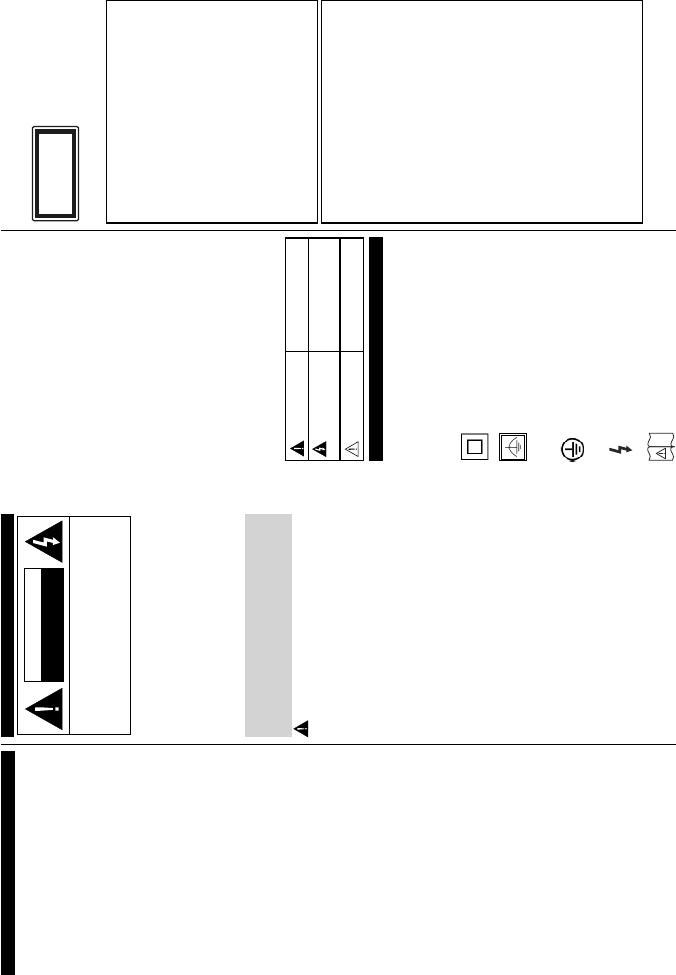
Información De Seguridad
PRECAUCIÓN
RIESGO DE DESCARGA
ELÉCTRICA
NO ABRIR
PRECAUCIÓN: PARA REDUCIR EL RIESGO DE DESCARGA
ELÉCTRICA NO RETIRE LA TAPA (O EL PANEL
TRASERO).
NO CONTIENE PIEZAS QUE PUEDAN SER
CAMBIADAS POR EL USUARIO. PÓNGASE
EN CONTACTO CON PERSONAL TÉCNICO
CUALIFICADO
.
Nota: Siga las instrucciones en pantalla para la operación
de las funciones relacionadas.
En climas extremos (tormentas, relámpagos) y
largos periodos de inactividad (irse de vacaciones)
desconecte el televisor de la red eléctrica
.
El enchufe de corriente sirve para desconectar el televisor de
la electricidad y, por lo tanto, siempre debe estar accesible.
Si
el televisor no se desconecta de la red eléctrica, el dispositivo
aún consumirá energía para todas las situaciones, incluso si
el televisor está en modo de espera o apagado.
IMPORTANTE - Por favor, lea
completamente estas instrucciones
antes de instalar o de utilizar
ADVERTENCIA: No permita nunca que ninguna
persona (incluyendo niños) con discapacidades
físicas, sensoriales o mentales, o que carezca
de experiencia o conocimientos, utilicen algún
aparato eléctrico sin supervisión
.
Utilice este aparato de TV a una altura de menos de
2000 metros sobre el nivel del mar, en lugares secos
y en regiones con climas templados o tropicales.
El televisor está diseñado para uso doméstico y uso
general similar, pero también puede ser utilizado en
lugares públicos.
Para facilitar la ventilación, deje al menos 5 cm de
espacio libre alrededor de la TV.
La ventilación no debe impedirse al cubrir o bloquear
las aberturas de ventilación con objetos como
periódicos, manteles, cortinas, etc.
Se debe poder acceder fácilmente al cable de
corriente. No coloque el televisor, ni ningún mueble,
etc., sobre el cable de corriente, ni lo pise. Un cable
deteriorado puede causar un incendio o provocarle
una descarga eléctrica. Agarre el cable de corriente
por la clavija de enchufe; no desenchufe el televisor
tirando del cable de corriente. No toque nunca el
cable con las manos mojadas, pues podría causar
un cortocircuito o sufrir una descarga eléctrica. No
haga nunca un nudo en el cable ni lo empalme
con otros cables. Deberá sustituirlo cuando esté
dañado, siendo únicamente un profesional quien
puede hacerlo.
No exponga el televisor a goteos y salpicaduras
de líquidos y no coloque objetos que contengan
øQGLFH
Información De Seguridad ......................................1
Marcas en el producto ............................................2
Información Medioambiental ..................................3
Funciones ............................................................... 3
Accesorios Incluidos ...............................................4
1RWL¿FDFLRQHVGHOPRGRHQHVSHUD ........................4
Interruptor de Control y Funcionamiento del
Televisor .................................................................4
Colocación de las pilas en el mando a distancia ....4
Conexión a Corriente .............................................4
Conexión de la Antena ...........................................5
Aviso sobre la licencia ............................................5
Mando a Distancia ..................................................6
Conexiones.............................................................7
Encendido/Apagado ...............................................8
Instalación inicial ....................................................8
Reproducción Multimedia por la Entrada USB .......9
Grabación de un programa.....................................9
Grabación diferida ................................................10
Grabación instantánea .........................................10
Ver los Programas Grabados ..............................10
&RQ¿JXUDFLyQGHJUDEDFLyQ..................................10
Menú del Explorador Multimedia ..........................10
FollowMe TV (si está disponible) ..........................10
CEC y CEC RC Passthrough ...............................10
E-Manual .............................................................. 11
Contenido del Menú de TV ...................................12
General / Función de TV ......................................15
Manejo de la Lista de Canales .............................15
&RQ¿JXUDUODVRSFLRQHVGHFRQWUROSDUHQWDO ......... 15
Guía de Programación Electrónica (EPG)............16
Servicios de Teletexto ...........................................16
Actualización de Software ....................................17
Solución de Problemas y Consejos ...................... 17
Modos Habituales de Visualización de Entrada de
PC.........................................................................18
Compatibilidad con señales AV y HDMI ...............18
)RUPDWRVGH¿FKHURVGHYtGHRDGPLWLGRVSDUDHO
modo USB ............................................................19
)RUPDWRVGH¿FKHURVGHIRWRVDGPLWLGRVSDUDHO
modo USB ............................................................19
)RUPDWRVGH¿FKHURVGHDXGLRDGPLWLGRVSDUDHO
modo USB ............................................................20
)RUPDWRVGH¿FKHURVGHVXEWtWXORVDGPLWLGRVSDUD
el modo USB ........................................................20
Resoluciones DVI Admitidas ................................21
Portal Internet .......................................................25
Explorador Web ....................................................26
Sistema de TV Híbrida HBBTV ............................26
Smart Center ........................................................27
Español - 2 -
OtTXLGRV FRPR ÀRUHURV WD]DV HWF R PiV VREUH
el televisor (por ej., en los estantes por encima de
la unidad).
No exponga el televisor a la luz solar directa ni
llamas abiertas, tales como velas encendidas en la
parte superior o cerca del televisor.
No coloque ninguna fuente de calor como
calentadores eléctricos, radiadores, etc. cerca del
televisor.
No coloque el televisor en el piso ni en las
VXSHU¿FLHVLQFOLQDGDV
3DUDHYLWDUHOSHOLJURGHDV¿[LDPDQWHQJDODVEROVDV
de plástico fuera del alcance de los bebés, los niños
y los animales domésticos.
Ponga cuidadosamente el soporte al televisor. Si el
soporte requiere tornillos para el montaje pongalos.
(YLWHDSUHWDUORVWRUQLOORVHQH[FHVR\SDUD¿QDOL]DU
coloque las protecciones de caucho en el pie.
No deseche las pilas en el fuego o con materiales
SHOLJURVRVRLQÀDPDEOHV
Advertencia: Nunca exponga las pilas a una fuente
de calor excesiva como por ejemplo la luz solar, el
fuego o similares.
Precaución
Riesgo de lesiones graves
o muerte
Riesgo de descarga
eléctrica
Riesgo de tensión peligrosa
Mantenimiento
Importante componente de
mantenimiento
Marcas en el producto
Los siguientes símbolos se utilizan como marcadores
sobre las restricciones, precauciones e instrucciones
de seguridad del producto. Cada explicación se
deberá tomar en cuenta dependiendo de la ubicación
de tales marcas. Le rogamos que tenga en cuenta
dicha información por motivos de seguridad.
Equipo de Clase II: Este aparato está
diseñado de una manera tal que no requiere
una conexión de seguridad a tierra eléctrica.
Equipo de Clase II con puesta a tierra
funcional: Este aparato está diseñado de una
manera tal que no requiere una conexión de
seguridad a tierra eléctrica, la conexión a tierra se
XWLOL]DSDUD¿QHVIXQFLRQDOHV
Conexión de protección a tierra: La terminal
marcada está destinada para la conexión
del conductor de protección asociada con el
cableado de alimentación.
Terminal viva peligrosa: La(s) terminal(es)
marcada(s) live (viva) es/son peligrosa(s) bajo
condiciones normales de operación.
Precaución, consulte las instrucciones de
funcionamiento: El(las) área(s) marcada(s)
contiene(n) pilas tipo moneda o botón reemplazables
por el usuario.
Producto Láser Clase 1
Este producto contiene una
fuente láser Clase 1 que
es segura en condiciones
razonablemente previsibles
de funcionamiento.
ADVERTENCIA
No ingiera pilas, hay riesgo de quemaduras
químicas.
Este producto o los accesorios suministrados con
el producto pueden contener una pila tipo moneda /
botón. Si la pila de botón es ingerida, puede causar
quemaduras internas graves en solo 2 horas y
puede llevar a la muerte.
Mantenga las pilas nuevas y usadas lejos de los
niños.
Si el compartimiento de las pilas no se cierra
de forma segura, deje de usar el producto y
manténgalo alejado de los niños.
Si usted piensa que las pilas podrían haber sido
ingeridas o estar dentro de cualquier parte del
cuerpo, busque atención médica inmediata.
ADVERTENCIA
Nunca coloque un aparato de televisión en un
lugar inestable. Un televisor puede caerse y causar
lesiones personales graves o la muerte. Podrá
evitar lesiones o heridas, especialmente a los niños,
tomando precauciones tan sencillas como:
Utilizar soportes recomendados por el fabricante
del televisor.
Utilizar únicamente mobiliario que pueda soportar
VHJXUD\VX¿FLHQWHPHQWHHOSHVRGHOWHOHYLVRU
Asegurarse de que el televisor no sobresalga del
borde del mueble.
No coloque el televisor en un mueble alto (por ej.,
DUPDULRV\HVWDQWHUtDVVLQ¿MDUWDQWRHOPXHEOH
como el televisor a un soporte adecuado.
No coloque el aparato de televisión sobre tela u
otros materiales colocados entre la televisión y
muebles de apoyo.
Enseñe a los niños los peligros de subirse al
mueble para tocar el televisor y sus controles.
Si su televisor existente está siendo retenido
y trasladado, se deben aplicar las mismas
consideraciones que arriba.


Download manual in English (PDF, 2.88 MB)
(Consider the environment and only print this manual if it is really necessary)

Loading…

Rating

Let us know what you think about the EVVO Smart 55 UHD HDR LCD Television by leaving a product rating. Want to share your experiences with this product or ask a question? Please leave a comment at the bottom of the page.
Are you satisfied with the EVVO Smart 55 UHD HDR LCD Television?
Yes No
Be the first to rate this product
0 votes

Join the conversation about this product

Here you can share what you think about the EVVO Smart 55 UHD HDR LCD Television. If you have a question, first carefully read the manual. Requesting a manual can be done by using our contact form.

More about this manual

We understand that it’s nice to have a paper manual for your EVVO Smart 55 UHD HDR LCD Television. You can always download the manual from our website and print it yourself. If you would like to have an original manual, we recommend you contact EVVO. They might be able to provide an original manual. Are you looking for the manual of your EVVO Smart 55 UHD HDR LCD Television in a different language? Choose your preferred language on our homepage and search for the model number to see if we have it available.

Specifications

Brand EVVO
Model Smart 55 UHD HDR
Category LCD Televisions
File type PDF
File size 2.88 MB

All manuals for EVVO LCD Televisions
More manuals of LCD Televisions

Frequently Asked Questions about EVVO Smart 55 UHD HDR LCD Television

Our support team searches for useful product information and answers to frequently asked questions. If you find an inaccuracy in our frequently asked questions, please let us know by using our contact form.

How do I connect a universal remote control to my television? Verified

To connect your universal remote control, you need the model number and brand name of both the remote control and the television. There is a list of codes for brands and model numbers in the manual of the remote control .

This was helpful (2260) Read more

I want to connect a speaker to my LCD television with HDMI, which port should I use? Verified

You need to use the HDMI-ARC port, which is specifically made for connecting audio equipment.

This was helpful (1583) Read more

Does it matter to which HDMI port I connect my device? Verified

In general you can connect a device like a blu-ray player or game console to any HDMI port. The device can then be used by selecting the corresponding HDMI channel on your television.

This was helpful (798) Read more

How do I measure the inches of my LCD television? Verified

Measuring the inches on your LCD television is done by measuring the diagonal distance between for example the upper left corner and the lower right corner of the screen (not the edge). One inch equals 2,54 centimeter, so when you measure 99 centimeter, this means your LCD television is 39 inches.

This was helpful (543) Read more

Will my remote control also work on other television models of the same brand? Verified

Often a remote control of a television will also work on similar models of the same brand. However, it is unusual that it will work on all models of that brand. Universal remote controls are more suited to do this.

This was helpful (340) Read more

What is the difference between LCD and LED? Verified

Both techniques use an LCD screen that emits no light by itself. The difference is in the lighting behind the screen. With LCD screens this is done by CCFL (cold-cathode fluorescent lamp) and LED makes use of LED lights.

This was helpful (304) Read more

Can I repair a dead pixel myself? Verified

There is a difference between a dead pixel and a stuck pixel. A stuck pixel is still coloured and might be fixed by applying light pressure exactly onto the pixel until it restores itself. A dead pixel is always black or white and can't be repaired by yourself.

This was helpful (300) Read more

What does HDMI stand for? Verified

HDMI stands for High-Definition Multimedia Interface. HDMI is a connection to send high quality video and audio from one device to another.

This was helpful (276) Read more

Why are there letters next to the numbers on the remote control? Verified

Certain television settings may require you to enter letters. There are usually three letters or other characters on a button. When letter input is required, you can press that button once for the first letter, press twice for the second letter and press 3 times for the third letter. This way, text can be written with a minimum number of buttons.

This was helpful (247) Read more

What is the contrast ratio? Verified

The contrast ratio tells how far the whitest white is from the blackest black. A contrast ratio of for example 400:1 means that the blackest black on screen is 400 times darker than the whitest white. A high contrast ratio contributes to the sharpness of the image.

This was helpful (212) Read more

How can I properly clean my LCD television? Verified

Turn off the television and wipe dust and dirt off the screen with a microfiber cloth. Do not use paper, this can cause scratches. Do not apply too much pressure or you might cause damage to pixels. Use a specialized detergent or make one by mixing 1 part vinegar with 1 part water. Moisten the cloth with the detergent and clean the screen. Make sure the cloth is not too wet. Remove stains by making rotating movements. Dry the screen with a second microfiber cloth to prevent stripes.

This was helpful (209) Read more

What is the optimal viewing distance for my television? Verified

This partially depends on personal preference, but as a rule of thumb the optimal viewing distance is about 3x the diagonal screen size of the television. For a television of 60 inch (152cm) the optimal viewing distance would be 180 inch or about 4.5 meter.

This was helpful (206) Read more

What does LCD stand for? Verified

LCD stands for Liquid Crystal Display and is a technology that allows liquid crystals to polarise light to generate colours.

This was helpful (205) Read more
Manual EVVO Smart 55 UHD HDR LCD Television

Related products

Related categories

×
Download