Manual ESET NOD32 Antivisrus 4

Need a manual for your ESET NOD32 Antivisrus 4? Below you can view and download the PDF manual for free in English. This product currently has 0 frequently asked questions, 0 comments and has 0 votes. If this is not the manual you want, please contact us.

Is your product defective and the manual offers no solution? Go to a Repair Café for free repair services.

Manual

Loading…
6
2.2 Custom installation
Custom installation is designed for users who have experience with
fine‑tuning programs and who wish to modify advanced settings
during installation.
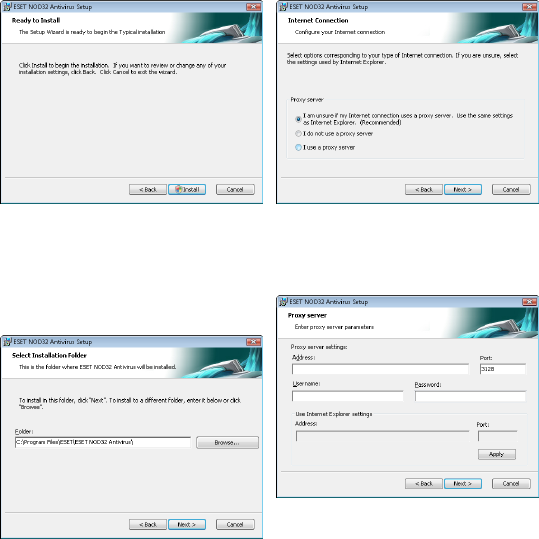
After selecting the installation mode and clicking Next, you will
be prompted to select a destination location for the installation.
By default, the program installs in C:\Program Files\ESET\ESET
NOD32 Antivirus\. Click Browse… to change this location (not
recommended).
Next, Enter your Username and Password. This step is the same as in
Typical installation (see section 2.1, Typical installation”).
After entering your username and password, click Next to proceed to
Configure your Internet connection.
If you use a proxy server, it must be correctly configured for virus
signature updates to work correctly. If you do not know whether you
use a proxy server to connect to the Internet, leave the default setting
I am unsure if my Internet connection uses a proxy server. Use the
same settings as Internet Explorer (Recommended) and click Next.
If you do not use a proxy server, select the I do not use a proxy server
option.
To configure your proxy server settings, select I use a proxy server
and click Next. Enter the IP address or URL of your proxy server in the
Address field. In the Port field, specify the port where the proxy server
accepts connections (3128 by default). In the event that the proxy
server requires authentication, enter a valid Username and Password
to grant access to the proxy server. Proxy server settings can also be
copied from Internet Explorer if desired. To do this, click Apply and
confirm the selection.
Download manual in English (PDF, 2.91 MB)
(Consider the environment and only print this manual if it is really necessary)

Loading…

Rating

Let us know what you think about the ESET NOD32 Antivisrus 4 by leaving a product rating. Want to share your experiences with this product or ask a question? Please leave a comment at the bottom of the page.
Are you satisfied with the ESET NOD32 Antivisrus 4?
Yes No
Be the first to rate this product
0 votes

Join the conversation about this product

Here you can share what you think about the ESET NOD32 Antivisrus 4. If you have a question, first carefully read the manual. Requesting a manual can be done by using our contact form.

More about this manual

We understand that it’s nice to have a paper manual for your ESET NOD32 Antivisrus 4. You can always download the manual from our website and print it yourself. If you would like to have an original manual, we recommend you contact ESET. They might be able to provide an original manual. Are you looking for the manual of your ESET NOD32 Antivisrus 4 in a different language? Choose your preferred language on our homepage and search for the model number to see if we have it available.

Specifications

Brand ESET
Model NOD32 Antivisrus 4
Category Software
File type PDF
File size 2.91 MB

All manuals for ESET Software
More manuals of Software
Manual ESET NOD32 Antivisrus 4

Related products

Related categories

×
Download