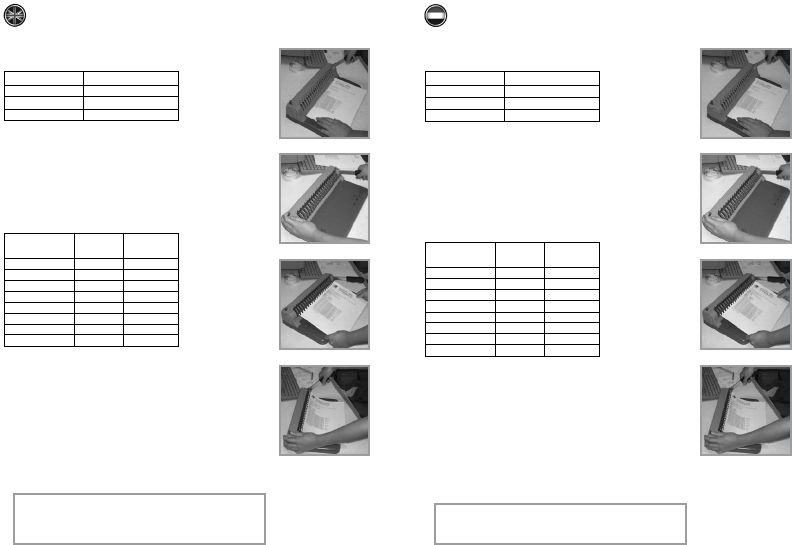
Perforate
1. Select correct paper format:
2. Place the papers flat on the table of the binding machine and insert
them straight.
Maximum 8 paper sheets of 80 gram per m2 at once.
Maximum 2 pieces of PVC covers of 0,3 mm thickness (per piece) at once.
3. Pull the handle downwards, the sheets are now being punched.
Release the handle and take the sheets out of the machine.
Bind
1. Select the correct plastic binding comb.
See index below for the correct size binding and numbers of sheets.
2. Place the binding comb with the open part on top of the binding machine.
The teeth of the binding machine must fit into the rings of the binding comb.
3. Push the handle downwards to create maximum opening ofthe binding comb.
The handle can be “locked” with the button on top of the machine on the
left hand side.
4. Place the rings of the binding comb through the perforated holes ofall the
sheets. Hold the handle at the right side and change thebutton from “locked”
to “open”. Release the handle upwards and you are able to take out the
complete document.
Maximum 150 sheets at once binding.
Maximum diameter binding comb 18 mm.
Attention:
1. Empty the waste draw, located at the backside of
the machine, regularly.
2. Keep out of the reach of children.
Format
A4
Cover
Letter
Paperlength
296 mm
285 mm
279 mm
Operation instruction
Number sheets
80gr/m2
1-20
20-40
40-60
60-80
80-100
100-120
120-140
140-160
mm Ø
6
8
10
11
12
14
16
18
inch Ø
1/4
5/16
3/8
7/16
1/2
9/16
5/8
23/32
Perforeren
1. Selecteer juiste papierformaat:
2. Leg de vellen die u wilt perforeren plat op het blad van de inbindmachine en
duw deze recht tegen de binnenrand.
Maximaal 8 vellen van 80 gram per m2 papier tegelijkertijd.
Maximaal 2 kunststof kaften van 0,3 mm dik (per stuk) tegelijkertijd.
3. Haal de hendel naar beneden. De vellen worden geperforeerd.
Laat de hendel weer los en u kunt de vellen uit de machine nemen.
Inbinden
1. Selecteer de juiste formaat kunststof inbindrug.
Zie onderstaande tabel voor de juiste maat doorsnede van de ring bij welk
aantal pagina’s.
2. Plaats de inbindrug met de opening naar boven bovenop de inbindmachine.
De tanden van de inbindmachine moeten in de ringen van de inbindrug vallen.
3. Haal de hendel naar beneden, zodat u een maximale opening creëert.
U kunt de hendel vastzetten door de knop links bovenop de machine op
“locked” te zetten.
4. Laat de ringen van de inbindrug door de perforatie van het geperforeerde
materiaal vallen totdat alles is toegevoegd. Houd de hendel rechts vast en
schakel de knop van “locked” naar “open”. Vervolgens brengt u de hendel
naar boven en kunt u het ingebonden document uitnemen.
Maximaal 150 vellen tegelijkertijd inbinden.
Maximale diameter inbindrug 18 mm.
Let op:
1. Leeg de papierlade aan de achterzijde regelmatig
2. Buiten bereik van kinderen houden
Formaat
A4
Cover
Letter
Papierlengte
296 mm
285 mm
279 mm
Gebruiksaanwijzing inbindmachine
Aantal vel
80gr/m2
1-20
20-40
40-60
60-80
80-100
100-120
120-140
140-160
mm Ø
6
8
10
11
12
14
16
18
inch Ø
1/4
5/16
3/8
7/16
1/2
9/16
5/8
23/32


Join the conversation about this product
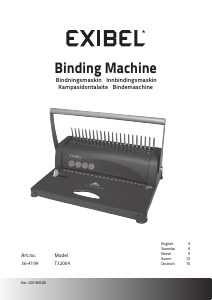
Here you can share what you think about the Desq 75010 Binding Machine. If you have a question, first carefully read the manual. Requesting a manual can be done by using our contact form.