Manual Dell OptiPlex GX520 Desktop Computer

Need a manual for your Dell OptiPlex GX520 Desktop Computer? Below you can view and download the PDF manual for free in English. This product currently has 1 frequently asked question, 0 comments and has 0 votes. If this is not the manual you want, please contact us.

Is your product defective and the manual offers no solution? Go to a Repair Café for free repair services.

Manual

Loading…
Back to Contents Page
Advanced Features
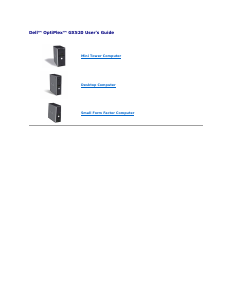
Dell™OptiPlex™GX520User'sGuide
LegacySelect Technology Control
Manageability
Security
Password Protection
System Setup
Booting to a USB Device
Clearing Forgotten Passwords
Clearing CMOS Settings
Hyper-Threading
Power Management
LegacySelect Technology Control
LegacySelect technology control offers legacy-full, legacy-reduced, or legacy-free solutions based on common platforms, hard-drive images, and help desk
procedures.Controlisprovidedtotheadministratorthroughsystemsetup,DellOpenManage™ITAssistant,orDellcustomfactoryintegration.
LegacySelect allows administrators to electronically activate or deactivate connectors and media devices that include serial and USB connectors, a parallel
connector, a floppy drive, PCI slots, and a PS/2 mouse. Connectors and media devices that are deactivated make resources available. You must restart the
computer to effect the changes.
Manageability
Alert Standard Format
ASF is a DMTF management standard that specifies "pre-operating system" or "operating system-absent" alerting techniques. The standard is designed to
generate an alert on potential security and fault conditions when the operating system is in a sleep mode or the system is turned off. ASF is designed to
supersede previous operating-system-absent alerting technologies.
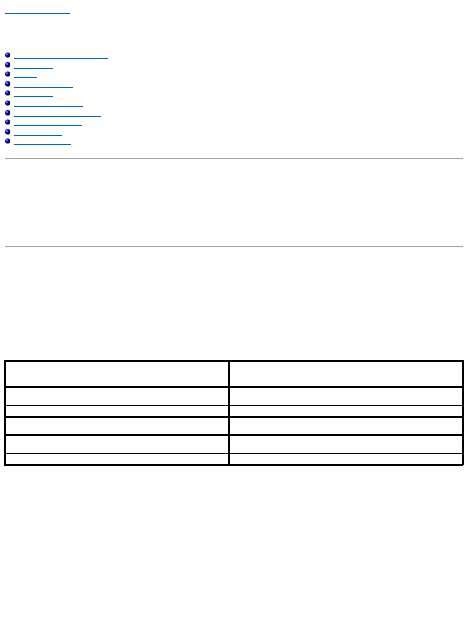
Your computer supports the following ASF version 1.03 and 2.0 alerts and remote capabilities:
For more information about Dell's ASF implementation, see the ASF User's Guide and the ASF Administrator's Guide, which are available on the Dell Support
website at support.dell.com.
DellOpenManage™ITAssistant
IT Assistant configures, manages, and monitors computers and other devices on a corporate network. IT Assistant manages assets, configurations, events
(alerts), and security for computers equipped with industry-standard management software. It supports instrumentation that conforms to SNMP, DMI, and CIM
industry standards.
Dell OpenManage Client instrumentation, which is based on DMI and CIM, is available for your computer. For information on IT Assistant, see the Dell
OpenManage IT Assistant User's Guide available on the Dell Support website at support.dell.com.
Dell OpenManage Client Instrumentation
Dell OpenManage Client Instrumentation is software that enables remote management programs such as IT Assistant to do the following:
l Access information about your computer, such as how many processors it has and what operating system it is running.
Alert
Description
Chassis: Chassis Intrusion Physical Security Violation/Chassis
Intrusion Physical Security Violation Event Cleared
The computer chassis with the chassis intrusion feature installed and enabled
has been opened or the chassis intrusion alert has been cleared.
CPU: Emergency Shutdown Event
The processor temperature is too hot and the power supply has shut down.
Cooling Device: Generic Critical Fan Failure/Generic Critical Fan
Failure Cleared
The fan speed (rpm) is out of limits or the fan speed (rpm) problem has been
resolved.
Temperature: Generic Critical Temperature Problem/Generic Critical
Temperature Problem Cleared
The computer temperature is out of limits or the computer temperature
problem has been resolved.
Battery Low
The system battery has reached a voltage of 2.2 V or lower.
Download manual in English (PDF, 5.1 MB)
(Consider the environment and only print this manual if it is really necessary)

Loading…

Rating

Let us know what you think about the Dell OptiPlex GX520 Desktop Computer by leaving a product rating. Want to share your experiences with this product or ask a question? Please leave a comment at the bottom of the page.
Are you satisfied with the Dell OptiPlex GX520 Desktop Computer?
Yes No
Be the first to rate this product
0 votes

Join the conversation about this product

Here you can share what you think about the Dell OptiPlex GX520 Desktop Computer. If you have a question, first carefully read the manual. Requesting a manual can be done by using our contact form.

More about this manual

We understand that it’s nice to have a paper manual for your Dell OptiPlex GX520 Desktop Computer. You can always download the manual from our website and print it yourself. If you would like to have an original manual, we recommend you contact Dell. They might be able to provide an original manual. Are you looking for the manual of your Dell OptiPlex GX520 Desktop Computer in a different language? Choose your preferred language on our homepage and search for the model number to see if we have it available.

Specifications

Brand Dell
Model OptiPlex GX520
Category Desktop Computers
File type PDF
File size 5.1 MB

All manuals for Dell Desktop Computers
More manuals of Desktop Computers

Frequently Asked Questions about Dell OptiPlex GX520 Desktop Computer

Our support team searches for useful product information and answers to frequently asked questions. If you find an inaccuracy in our frequently asked questions, please let us know by using our contact form.

How much are kilobyte, megabyte, gigabyte and terabyte? Verified

One kilobyte consists of 1000 bytes. 1 megabyte = 1000 kilobyte. 1 gigabyte = 1000 megabyte. 1 terabyte = 1000 gigabyte.

This was helpful (31) Read more
Manual Dell OptiPlex GX520 Desktop Computer

Related products

Related categories

×
Download