
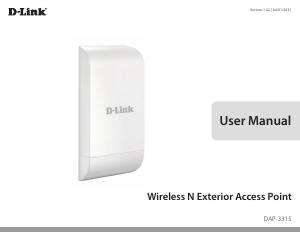
2D-Link DAP-3315 User Manual
Table of Contents
Product Overview .............................................................. 4
Package Contents .........................................................................4
System Requirements ................................................................. 5
Introduction ................................................................................... 6
Features ............................................................................................ 8
Hardware Overview ..................................................................... 9
Connections ........................................................................... 9
LEDs .........................................................................................10
Installation .......................................................................11
Wireless Installation Considerations ....................................13
Conguration ...................................................................14
Web-based Conguration Utility ..........................................14
Operating Modes ........................................................................ 15
Basic Settings ...............................................................................16
Wireless Settings .................................................................17
WDS .........................................................................................22
Wireless LAN Settings(Repeater mode) ......................23
LAN Settings .........................................................................24
Advanced Settings ....................................................................25
Performance .........................................................................25
Wireless Resource ...............................................................28
Multi-SSID ..............................................................................30
VLAN ........................................................................................31
Port List ..............................................................................32
Add/Edit VLAN ................................................................33
PVID Settings ...................................................................34
Intrusion .................................................................................35
Schedule ................................................................................36
DHCP Server .........................................................................37
Dynamic Pool Settings ................................................. 37
Static Pool Settings .......................................................38
Current IP Mapping List ...............................................39
Filter .........................................................................................40
MAC Address ACL ..........................................................40
WLAN Partition ...............................................................41
View Log .................................................................................42
Log Settings ..........................................................................43
DMZ (WISP mode only) ...............................................44
Virtual Server (WISP mode only) ..............................45
Port Forwarding (WISP mode only) .........................46
Parental Control (WISP mode only) ......................... 47
IP Routing (WISP mode only) ....................................48
Maintenance ................................................................................49
Administration Settings ...................................................49
Firmware and SSL Certication Upload ......................50
Conguration File ...............................................................51
Time and Date ...................................................................... 52
Status ..............................................................................................53
Device Information ............................................................53
Client Information ..............................................................54
Ethernet Information ......................................................... 55
WLAN Information .............................................................56
Conguration ...............................................................................57
Table of Contents


Join the conversation about this product
Here you can share what you think about the D-Link DAP-3315 Access Point. If you have a question, first carefully read the manual. Requesting a manual can be done by using our contact form.