English
GREAT BRITAIN • customer service
Ver. 20150401
Selfie Stick with Shutter Button
Art.no 38-7118 Model W-SQB-916
Please read theentire instruction manual before using theproduct
and then save it for future reference. We reserve theright for any
errors in text or images and any necessary changes made to
technical data. In theevent of technical problems or other queries,
please contact our Customer Services.
Safety
• Never expose thedevice to heavy vibrations, shocks,
rain or moisture.
• Do not let children play with theproduct.
Product description
Bluetooth connection
Connect theselfie stick to aBluetooth-enabled smartphone.
1. In off mode: Hold thebutton in for 5 seconds to make
theselfie stick detectable for other Bluetooth devices.
Theblue LED will start to flash.
2. Activate Bluetooth on thesmartphone to be paired with
theselfie stick.
3. Theselfie stick will appear on your smartphone as Winnersun,
select it and it will pair with your device. Theblue LED shines
steadily and theselfie stick is ready to use.
Taking photographs
1. Activate thecamera on your smartphone, adjust theangle
of theholder and fit your smartphone into it. Ensure that
thesmartphone is firmly secured.
Reconnect to thelatest connected smartphone
Depress thebutton for 3 seconds to switch theselfie stick on.
Theblue LED will shine for two seconds.
Theselfie stick will automatically reconnect with thelast
smartphone it was paired to, if thesmartphone is on and its
Bluetooth function is activated. Theblue LED will then come on.
Care and maintenance
Clean theselfie stick by wiping it with adamp cloth. Use only
mild cleaning agents, never solvents or corrosive chemicals.
Troubleshooting guide
Theselfie stick
won’t turn on.
Thebattery might be flat. Charge thebattery;
refer to theCharging section above.
Theshutter
release doesn’t
work.
• Make sure that theBluetooth
connection has been properly
established. Refer to theBluetooth
connection section above.
• Is thesmartphone in camera mode?
Disposal
This product should be disposed of in accordance with local
regulations. If you are unsure how to proceed, contact your
local council.
Specifications
Charging port USB, 5V, 120mA
Battery capacity 60 mA
Charging time 30min
Operating time 20 hours
Contracted length 18.5cm
Phone gripping range 58–80mm
Telescopic handle 26–80cm
Weight 148g
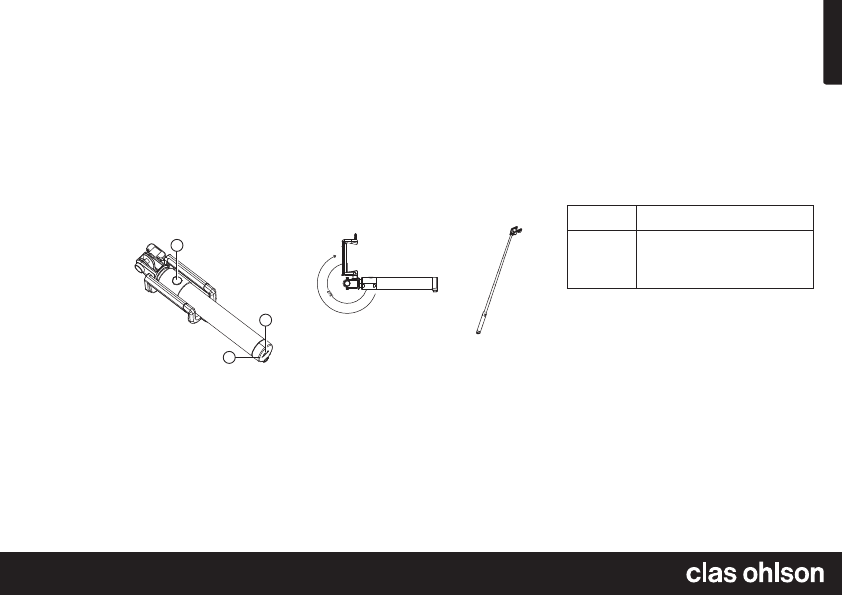
1
2
3
1. Button for on/off, Bluetooth
connection and shutter release.
Note: When you have used thebutton
for one command you must wait 5 seconds
before you can give thenext command
(except for taking photos).
2. Charging indicator
3. Micro-USB port for connecting acharger cable
Operating instructions
Charging
1. Connect theincluded charger lead to thecharging port (3)
on theselfie stick and to acomputer or other USB charger.
2. Thecharging indicator shines red while thebattery is
charging and goes out when thebattery is fully charged.
2. Extend thestick to thedesired length and take pictures by
pressing theshutter release button.
Note: Since theselfie stick is aBluetooth input device, you
cannot write messages when your smartphone is connected to
theselfie stick. Theselfie stick must be switched off in order for
you to regain full functionality of your smartphone.
Switching off
Depress thebutton for 4 seconds to switch theselfie stick off.
Theblue LED will flash quickly three times and then goes out.
Automatic shut-off
Theselfie stick will switch off automatically after 5 minutes
of inactivity.


Join the conversation about this product
Here you can share what you think about the Clas Ohlson W-SQB-916 Selfie Stick. If you have a question, first carefully read the manual. Requesting a manual can be done by using our contact form.