Manual Casio WS-1700H-1AVEF Watch

Need a manual for your Casio WS-1700H-1AVEF Watch? Below you can view and download the PDF manual for free in English. This product currently has 7 frequently asked questions, 0 comments and has 0 votes. If this is not the manual you want, please contact us.

Is your product defective and the manual offers no solution? Go to a Repair Café for free repair services.

Manual

Loading…
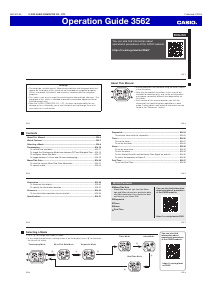
Operation Guide 3562
EN-19
To toggle between 12-hour and 24-hour timekeeping
In the Timekeeping Mode, press D to toggle between 12-hour timekeeping and
24-hour timekeeping.
x With the 12-hour format, the P (PM) indicator appears to the left of the hour digits
for times in the range of noon to 11:59 p.m. and the A (AM) indicator appears to
the left of the hour digits for times in the range of midnight to 11:59 a.m.
x With the 24-hour format, times are displayed in the range of 0:00 to 23:59, without
any indicator.
x The 12-hour/24-hour timekeeping format you select in the Timekeeping Mode is
applied in all other modes.
x The A and P indicators are not displayed with the Timekeeping Mode time on the
Timer Mode and Dual Time Mode screens.
EN-18
4. When the setting you want to change is flashing, use B and D to change it as
described below.
Setting Screen Button Operations
UTC Differential
Use B (–) and D (+) to change the setting.
x You can specify a value in the range of –12.0 to
+14.0, in 0.5-hour units.
Longitude Value
Use B (–) and D (+) to change the setting.
x You can specify a value in the range of 0° to 180°,
in 1-degree units.
East Longitude/
West Longitude
Use D to switch between east longitude (E) and
west longitude (W).
Lunitidal Interval Hours,
Minutes
Use B (–) and D (+) to change the setting.
x When the DST setting is on, the UTC differential can be set in a range of –11.0
to +15.0 in 0.5-hour units.
5. Press A to exit the setting screen.
EN-17
To configure Home Site data
1. In the Timekeeping Mode, hold down A until the
seconds start to flash, which indicates the setting
screen.
2. Press A again to display the UTC differential setting
screen.
3. Press C to move the flashing in the sequence shown
below to select other settings.
UTC Differential
East Longitude/
West Longitude
Longitude Value
C
C
C
C
Lunitidal Interval Minutes Lunitidal Interval Hours
C
UTC differential
EN-16
x The following is the initial factory default Home Site data (Tokyo, Japan) when you
first purchase the watch, and whenever you have the battery replaced. Change
these settings to match the area where you normally use the watch.
UTC differential (+9.0); Longitude (East 140 degrees); Lunitidal interval (5 hours,
20 minutes)
EN-15
Home Site Data
Moon phase, tide graph data, and Moon/Tide Data Mode data will not be displayed
properly unless Home Site data (UTC differential, longitude, and lunitidal interval) is
configured correctly.
x The UTC differential is a value that indicates the time difference between a
reference point in Greenwich, England and the time zone where a city is located.
x The letters “UTC” is the abbreviation for “Coordinated Universal Time”, which is the
world-wide scientific standard of timekeeping. It is based upon carefully maintained
atomic (cesium) clocks that keep time accurately to within microseconds. Leap
seconds are added or subtracted as necessary to keep UTC in sync with the
Earth’s rotation.
x The lunitidal interval is the time elapsing between the Moon’s transit over a
meridian and the next high tide at that meridian. See “Lunitidal Interval” (page
EN-45) for more information.
x This watch displays lunitidal intervals in terms of hours and minutes.
x The “Site/Lunitidal Interval Data List” at the back of this manual provides UTC
differential and longitude information around the world.
EN-14
To toggle the Timekeeping Mode time between DST and Standard Time
1. In the Timekeeping Mode, hold down A until the
seconds start to flash, which indicates the setting
screen.
2. Press C once to display the DST setting screen.
3. Press D to toggle between Daylight Saving Time (On
displayed) and Standard Time (OF displayed).
4. Press A twice to exit the setting screen.
x The DST indicator appears on the Timekeeping,
Moon/Tide Data, and Alarm Mode screens to indicate
that Daylight Saving Time is turned on. In the case
of the Moon/Tide Data Mode, the DST indicator
appears on the tide data screen only.
DST indicator
On/Off status
EN-13
4. Press A twice to exit the setting screen.
x The first press of A displays the UTC differential setting screen. Pressing A
again exits the setting screen.
x See “Daylight Saving Time (DST) Setting” below for details about the DST
setting.
x The day of the week is displayed automatically in accordance with the date
(year, month, and day) settings.
Daylight Saving Time (DST) Setting
Daylight Saving Time (summer time) advances the time setting by one hour from
Standard Time. Remember that not all countries or even local areas use Daylight
Saving Time.
EN-12
3. When the setting you want to change is flashing, use B and D to change it as
described below.
Screen To do this: Do this:
Reset the seconds to 00
Press D.
Toggle between Daylight Saving Time (On) and
Standard Time (OF)
Press D.
Change the hour or minutes
Use B (–) and D (+).
Change the year
Change the month or day
EN-11
Important!
x Be sure to configure the current time and date, and your Home Site data (data
for the site where you use the watch) correctly before using the functions of this
watch. See “Home Site Data” (page EN-15) for more information.
To set the time and date
1.
In the Timekeeping Mode, hold down A until the
seconds start to flash, which indicates the setting
screen.
2. Press C to move the flashing in the sequence shown
below to select the other settings.
Seconds
MinutesHourDST
Day
YearMonth
CC
CC
CC
C
EN-10
Timekeeping
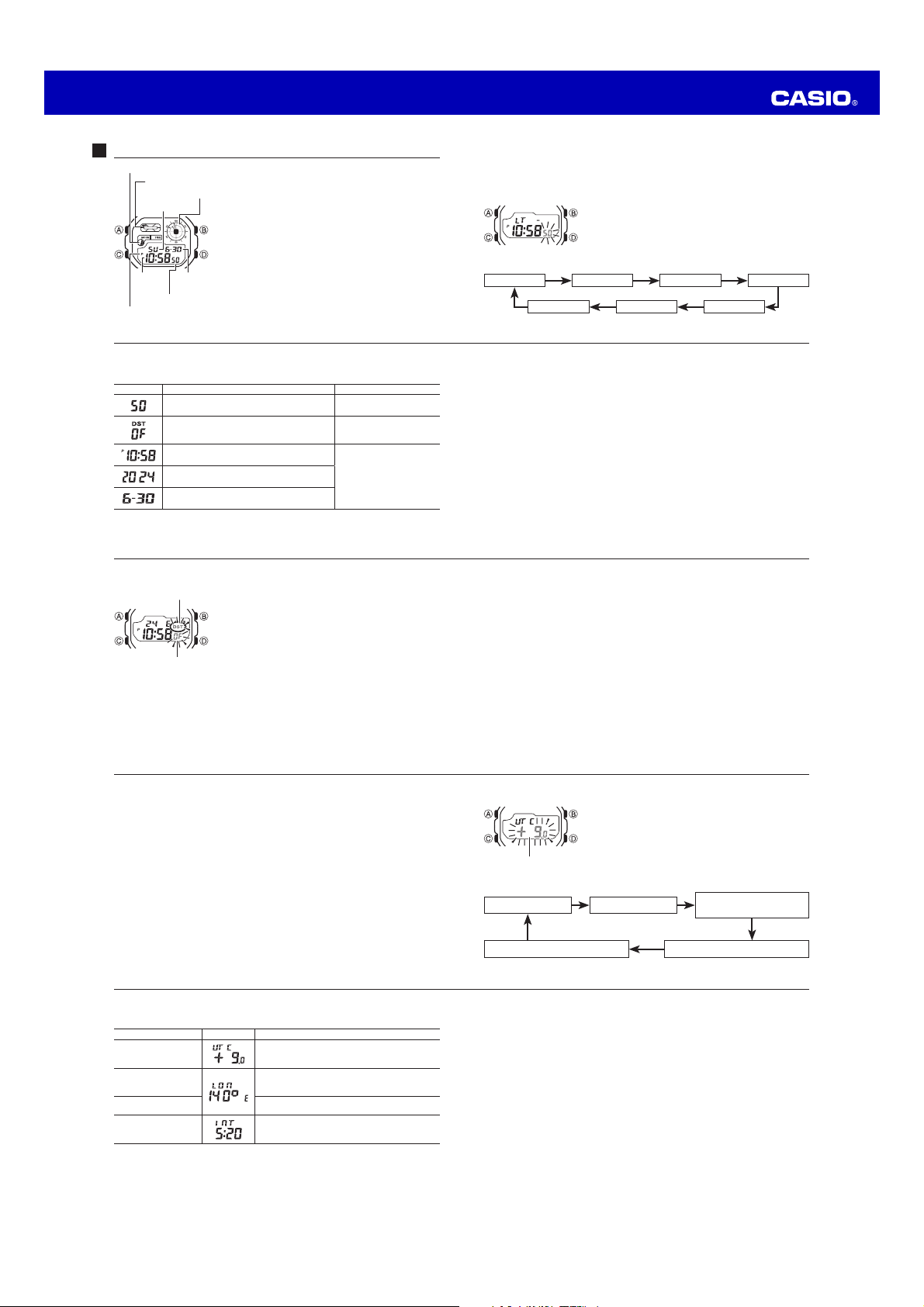
Use the Timekeeping Mode to set and view the current
time and date.
x The Moon phase indicator (page EN-42) shows the
current Moon phase in accordance with the current date
as kept in the Timekeeping Mode.
x The tide graph (page EN-44) shows tidal movements for
the current date in accordance with the current time as
kept in the Timekeeping Mode.
x The graphic area indicates the current time as kept
in the Timekeeping Mode. For details on reading the
graphic areas, see “Graphic Area” (page EN-46).
PM indicator
Seconds
Graphic area
Tide graph
Moon phase indicator
Day of week
Month –
Day
Hour :
Minutes
Download manual in English (PDF, 0.51 MB)
(Consider the environment and only print this manual if it is really necessary)

Loading…

Rating

Let us know what you think about the Casio WS-1700H-1AVEF Watch by leaving a product rating. Want to share your experiences with this product or ask a question? Please leave a comment at the bottom of the page.
Are you satisfied with the Casio WS-1700H-1AVEF Watch?
Yes No
Be the first to rate this product
0 votes

Join the conversation about this product

Here you can share what you think about the Casio WS-1700H-1AVEF Watch. If you have a question, first carefully read the manual. Requesting a manual can be done by using our contact form.

More about this manual

We understand that it’s nice to have a paper manual for your Casio WS-1700H-1AVEF Watch. You can always download the manual from our website and print it yourself. If you would like to have an original manual, we recommend you contact Casio. They might be able to provide an original manual. Are you looking for the manual of your Casio WS-1700H-1AVEF Watch in a different language? Choose your preferred language on our homepage and search for the model number to see if we have it available.

Specifications

Brand Casio
Model WS-1700H-1AVEF
Category Watches
File type PDF
File size 0.51 MB

All manuals for Casio Watches
More manuals of Watches

Frequently Asked Questions about Casio WS-1700H-1AVEF Watch

Our support team searches for useful product information and answers to frequently asked questions. If you find an inaccuracy in our frequently asked questions, please let us know by using our contact form.

A battery in my device is oxidized, can I still safely use it? Verified

Ja, the device can still be safely used. Firstly, remove the oxidizd battery. Never use bare hands to do this. Then clean the battery compartment with a cotton swab dipped in vinegar or lemon juice. Let it dry and insert new batteries.

This was helpful (942) Read more

My mechanical watch runs fast, what can I do? Verified

This might be caused by exposure to a magnetic field. It can be solved by a demagnetisation process performed by a professional watchmaker.

This was helpful (880) Read more

What do AM and PM stand for? Verified

AM stands for Ante Meridiem and indicates that the time is before midday. PM stands for Post Meridiem and indicates that the time is past midday.

This was helpful (756) Read more

What is a 'Chronograph'? Verified

A 'Chronograph' is literally a 'writer of time'. The term is used to describe clocks and watches that tell the time of day as well as measure a certain period of time, like a stopwatch.

This was helpful (660) Read more

What is GMT? Verified

GMT stands for Greenwich Mean Time (sometimes called UTC, standing for Coordinated Universal Time). It is the time for the longitude 0, that passes through Greenwich near London.

This was helpful (501) Read more

What is a quartz movement? Verified

Watches and clocks with a quartz movement are driven by a battery. This sends an electric current through quartz crystals that will vibrate. These vibrations are passed on to the movement. Because the vibrations have a fixed frequency, watches and clocks with a quartz movement are extremely precise.

This was helpful (483) Read more

There is moisture on the inside of the glass of my Casio watch, what should I do? Verified

Casio states that if the moisture appeared after an extreme change in temperature and disappears relatively quickly afterwards, there is probably nothing wrong. If the moisture does not disappear, you should have your watch repaired as soon as possible.

This was helpful (62) Read more
Manual Casio WS-1700H-1AVEF Watch

Related products

Related categories

×
Download