Manual Casio Collection W-212H-2AVES Watch

Need a manual for your Casio Collection W-212H-2AVES Watch? Below you can view and download the PDF manual for free in English. This product currently has 7 frequently asked questions, 1 comment and has 2 votes with an average product rating of 100/100. If this is not the manual you want, please contact us.

Is your product defective and the manual offers no solution? Go to a Repair Café for free repair services.

Manual

Loading…
2
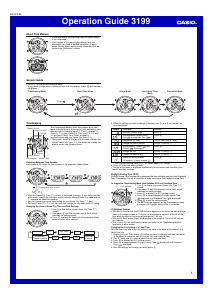
Operation Guide 3149
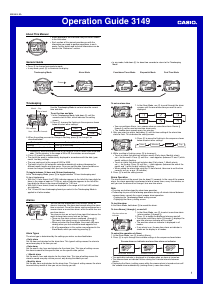
Illumination
An LED (light-emitting diode) illuminate the display for
easy reading in the dark.
Illumination Precautions
Illumination may be hard to see when viewed under
direct sunlight.
Illumination turns off automatically whenever an alarm
sounds.
Frequent use of illumination runs down the battery.
To illuminate the display
Press B to turn on illumination.
Dual Time
The Dual Time Mode lets you keep track of time in a different time zone.
In the Dual Time Mode, the seconds count is synchronized with the seconds count
of the Timekeeping Mode.
To set the Dual Time
1. Press C to enter the Dual Time Mode.
2. In the Dual Time Mode, hold down A until the hour
setting starts to flash, which indicates the setting
screen.
3. Press C to change the selection in the following
sequence.
Hour Minutes
4. Press D to increase the setting.
5. Press A to exit the setting screen.
Countdown Timer
The countdown timer can be set within a range of
1 minute to 24 hours. An alarm sounds when the
countdown reaches zero.
You can also select auto-repeat, which automatically
restarts the countdown from the original value you set
whenever zero is reached.
Countdown timer functions are available in the
Countdown Timer Mode, which you enter by pressing
C.
To use the countdown timer
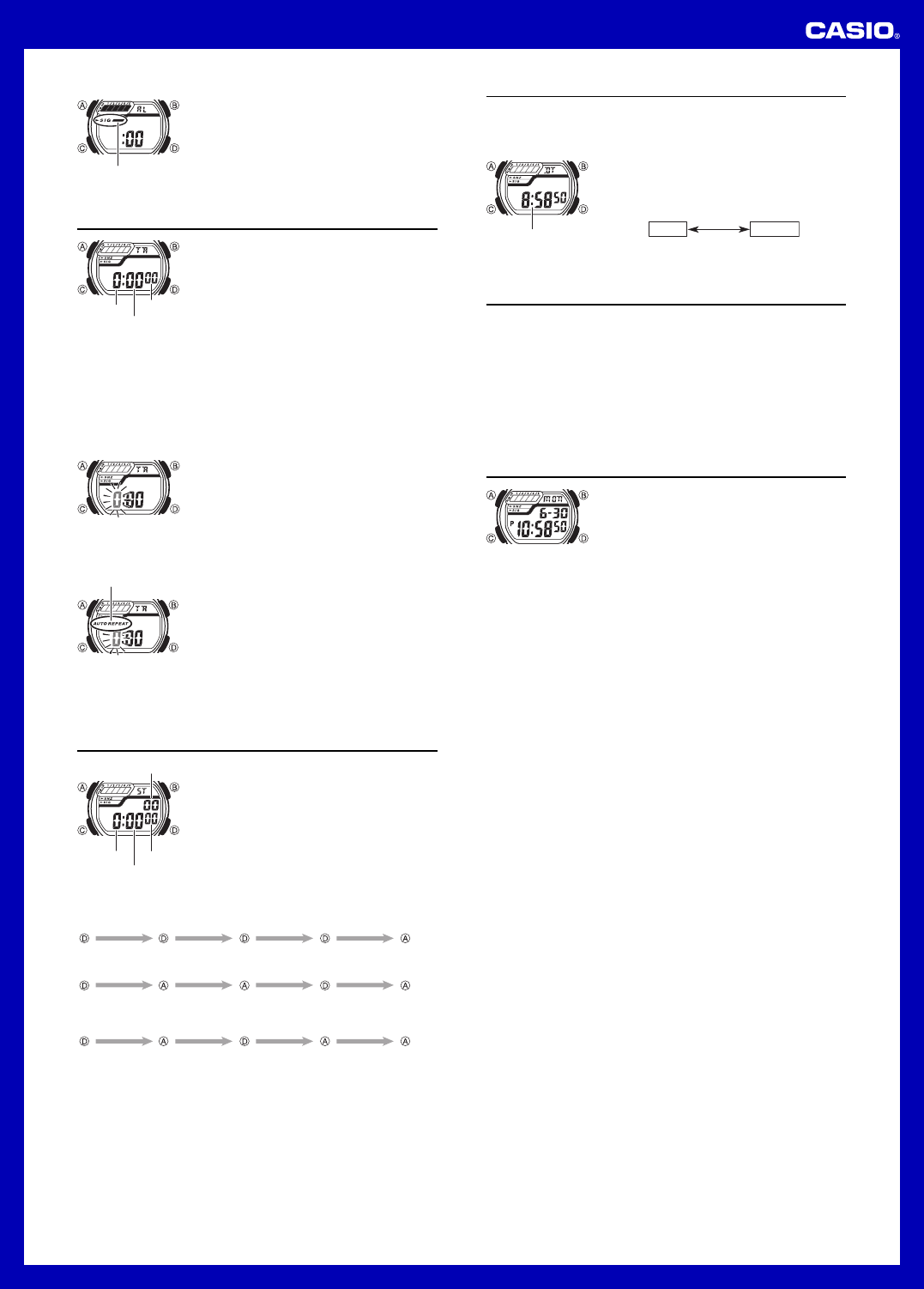
Press D while in the Countdown Timer Mode to start the countdown timer.
When the end of the countdown is reached and auto-repeat is turned off, the alarm
sounds for 10 seconds or until you stop it by pressing any button. The countdown
time is automatically reset to its starting value after the alarm stops.
Press D while a countdown operation is in progress to pause it. Press D again to
resume the countdown.
To completely stop a countdown operation, first pause it (by pressing D), and then
press A. This returns the countdown time to its starting value.
To set the countdown start time
1. In the Countdown Timer Mode, hold down A until the
hours setting of the countdown start time starts to flash,
which indicates the setting screen.
2. Press C to move the flashing between the hours and
minutes settings.
3. While a setting is flashing, use D to change it.
To set the starting value of the countdown time to
24 hours, set
0:00
.
4. Press A to exit the setting screen.
To turn auto-repeat on and off
1. In the Countdown Timer Mode, hold down A until the
hours setting of the countdown start time starts to flash,
which indicates the setting screen.
2. Press B to toggle auto-repeat on (
AUTO REPEAT
displayed) and off (
AUTO REPEAT
not displayed).
Note that pressing B in the above operation also turns
on the illumination.
When the end of the countdown is reached while
auto-repeat is on, the alarm sounds, but the countdown
restarts from the beginning without stopping. You can
stop the countdown by pressing D and manually reset
to the start time by pressing A.
The auto-repeat indicator appears in the Countdown
Timer Mode only.
Stopwatch
The stopwatch lets you measure elapsed time, split times,
and two finishes.
The display range of the stopwatch is 23 hours,
59 minutes, 59.99 seconds.
The stopwatch continues to run, restarting from zero
after it reaches its limit, until you stop it.
The stopwatch measurement operation continues even
if you exit the Stopwatch Mode.
Exiting the Stopwatch Mode while a split time is frozen
on the display clears the split time and returns to
elapsed time measurement.
All of the operations in this section are performed in the
Stopwatch Mode, which you enter by pressing C.
To measure times with the stopwatch
Elapsed time
Start Stop Re-start Stop Clear
Start
Split
(SPL displayed)
Split release Stop Clear
Start
Split Stop Split release Clear
Split time
Two Finishes
First runner
finishes.
Display time of
first runner.
Second runner
finishes.
Display time of
second runner.
To turn the hourly time signal on and off
1. In the Alarm Mode, use D to select the hourly time
signal (
:00
).
2. Press A to toggle it on and off.
Turning on the hourly time signal displays the hourly
time signal on indicator.
The hourly time signal on indicator is displayed in all
modes when the hourly time signal is turned on.
Hour
Minutes
Seconds
Hourly time signal on
indicator
Auto-repeat indicator
1/100 second
Hour
Minutes
Seconds
Hour : Minutes Seconds
Reference
This section contains more detailed and technical information about watch operation.
It also contains important precautions and notes about the various features and
functions of this watch.
Auto return features
If you leave a screen with flashing digits for two or three minutes without performing
any operation, the watch automatically saves any settings you have made up to that
point and exits the setting screen.
Data and Setting Scrolling
The D button is used to scroll through setting screen data on the display. Holding
down this button during a scroll operation scrolls through the data at high speed.
Download manual in English (PDF, 0.24 MB)
(Consider the environment and only print this manual if it is really necessary)

Loading…

Rating

Let us know what you think about the Casio Collection W-212H-2AVES Watch by leaving a product rating. Want to share your experiences with this product or ask a question? Please leave a comment at the bottom of the page.
Are you satisfied with the Casio Collection W-212H-2AVES Watch?
Yes No
100%
0%
2 votes

Join the conversation about this product

Here you can share what you think about the Casio Collection W-212H-2AVES Watch. If you have a question, first carefully read the manual. Requesting a manual can be done by using our contact form.

francis renon 21-08-2020
A pretty good ordinary model ,useful, but : What a pity that the glass is made of acrylic very vulnerable from scratches, and not minéral ! Also, i think the small windows with their black frames above the alarms and day zones cumbersome and superfluous. (too many such unsightly "embellishments"are visible on screens of good Casio digital watches ...) . To finisch, the black plastic band is poor quality and not very long lasting. Thus, the W212hd-1av would satisfy me better . Thank

reply | This was helpful (0)

More about this manual

We understand that it’s nice to have a paper manual for your Casio Collection W-212H-2AVES Watch. You can always download the manual from our website and print it yourself. If you would like to have an original manual, we recommend you contact Casio. They might be able to provide an original manual. Are you looking for the manual of your Casio Collection W-212H-2AVES Watch in a different language? Choose your preferred language on our homepage and search for the model number to see if we have it available.

Specifications

Brand Casio
Model Collection W-212H-2AVES
Category Watches
File type PDF
File size 0.24 MB

All manuals for Casio Watches
More manuals of Watches

Frequently Asked Questions about Casio Collection W-212H-2AVES Watch

Our support team searches for useful product information and answers to frequently asked questions. If you find an inaccuracy in our frequently asked questions, please let us know by using our contact form.

A battery in my device is oxidized, can I still safely use it? Verified

Ja, the device can still be safely used. Firstly, remove the oxidizd battery. Never use bare hands to do this. Then clean the battery compartment with a cotton swab dipped in vinegar or lemon juice. Let it dry and insert new batteries.

This was helpful (942) Read more

My mechanical watch runs fast, what can I do? Verified

This might be caused by exposure to a magnetic field. It can be solved by a demagnetisation process performed by a professional watchmaker.

This was helpful (880) Read more

What do AM and PM stand for? Verified

AM stands for Ante Meridiem and indicates that the time is before midday. PM stands for Post Meridiem and indicates that the time is past midday.

This was helpful (756) Read more

What is a 'Chronograph'? Verified

A 'Chronograph' is literally a 'writer of time'. The term is used to describe clocks and watches that tell the time of day as well as measure a certain period of time, like a stopwatch.

This was helpful (660) Read more

What is GMT? Verified

GMT stands for Greenwich Mean Time (sometimes called UTC, standing for Coordinated Universal Time). It is the time for the longitude 0, that passes through Greenwich near London.

This was helpful (501) Read more

What is a quartz movement? Verified

Watches and clocks with a quartz movement are driven by a battery. This sends an electric current through quartz crystals that will vibrate. These vibrations are passed on to the movement. Because the vibrations have a fixed frequency, watches and clocks with a quartz movement are extremely precise.

This was helpful (483) Read more

There is moisture on the inside of the glass of my Casio watch, what should I do? Verified

Casio states that if the moisture appeared after an extreme change in temperature and disappears relatively quickly afterwards, there is probably nothing wrong. If the moisture does not disappear, you should have your watch repaired as soon as possible.

This was helpful (62) Read more
Manual Casio Collection W-212H-2AVES Watch

Related products

Related categories

×
Download