Manual Calypso K5813 Watch

Need a manual for your Calypso K5813 Watch? Below you can view and download the PDF manual for free in English. This product currently has 6 frequently asked questions, 0 comments and has 0 votes. If this is not the manual you want, please contact us.

Is your product defective and the manual offers no solution? Go to a Repair Café for free repair services.

Manual

Loading…
IKMK5813M
ENGLISH
I
INSTRUCTION MANUAL
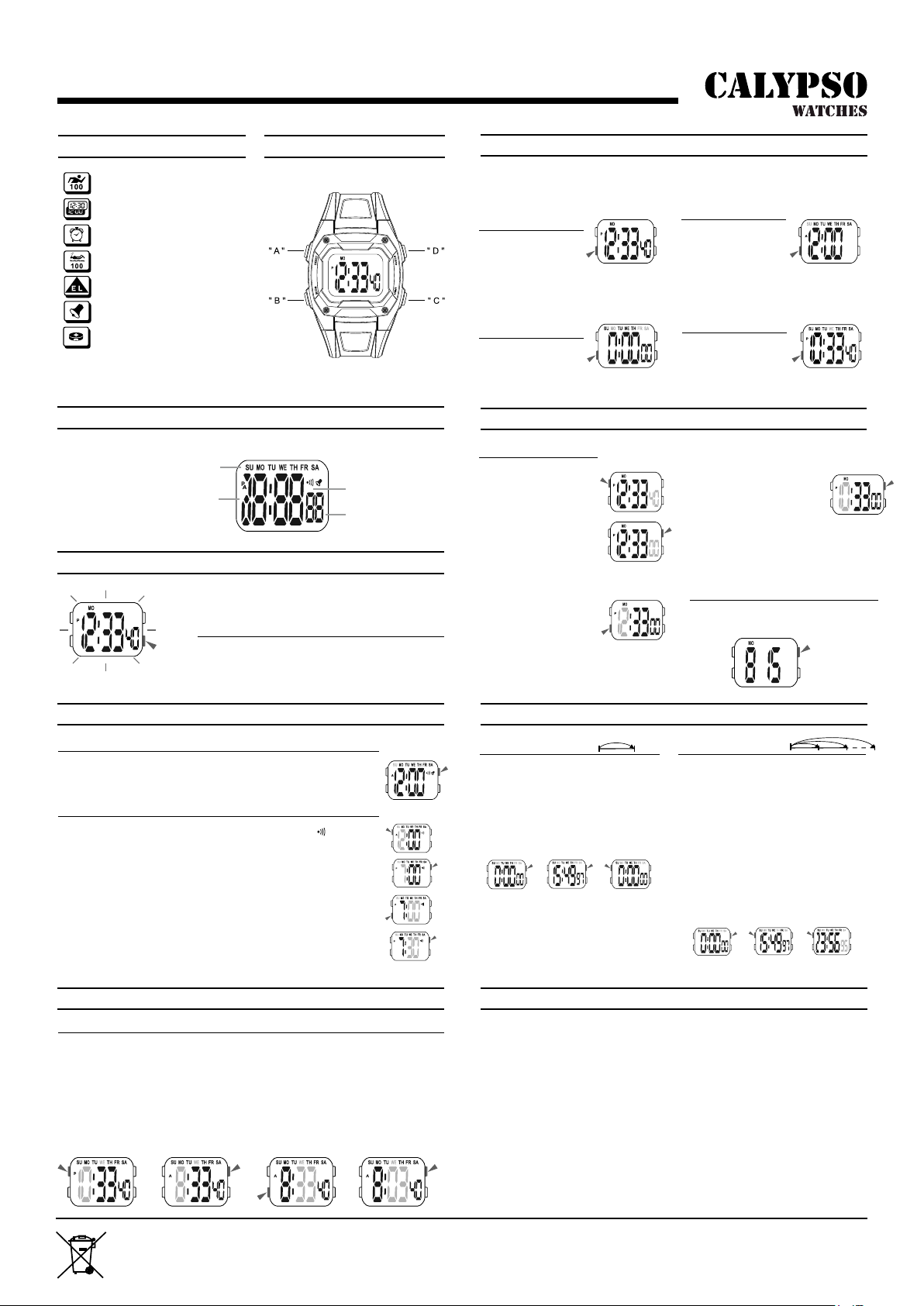
ICONS
MODE SELECTION
TIMEKEEPING
DISPLAY
BACKLIGHT
ALARM
DUAL TIME
STOPWATCH
ATENCIÓN
The operation el bullo ns are indicated by
using the letters shown in the illustration.
The screen shown in below:
The backlight that uses an EL (electro-luminescent) cause
the display to glow fer easy reading in !he dark.
Day of week
Hour
Seconds
Minutes
Press “B” to change mode to mode in the following Sequence:
Timekeeping Mode-Alarm Mode Stopwatch Mode - Dual Time Mode.
Time Setting
1. n the timekeeping mode,
press and hold “A” until
the seconds to flash
(flashing indicated in set
mode).
2. Press “D” to reset the
seconds.
3. Press “B” change to the
next selection.
4. Press “D” to increase the
number, press and hold to
increase al high speed.
5. Re peal step 3 and 4, the
selection in the fellowing
sequence: Seconds - Hour -
Minutes - Month - Date - Day
of week - 12/24H Format.
6. Press “A” to exit the set state,
alter you set.
TIMEKEEPING
12/24H Format;
Hour, Minutes,
Seconds, Day of week;
Build in Date.
Alarm and Chime
In the alarm mode, press “D” to en/off the alarm and chime in the fellowing
sequences: Alarm & Chime off - Alarm on -Chime on Alarm & Chime en.
A Lap Time
1. In the stopwatch mode, press “D” to start
the stopwatch.
2. To stop the stopwatch by pressing “D”
again.
3. Press “A” to reset the stopwatch.
Split Time
1. In the stopwatch mode, press “D” to start
the stopwatch.
2. Press “A” to display the split time,
stopwatch timing continues internally.
3. Press “A” lo clear !he split time and to
continue time measurement.
4. Reapeat step 2 and 3, you can measure
the multi split time.
5. Press “D” to stop the stopwatch.
Alarm Time Setting
1. In the alarm mode, press “A” the hour to flash, the indicator “ ” appear
(flashing indicated in set mode)
.
2. Press “D” to increase !he hour, press and hold to in crease al high speed.
3. Press “B” lo select lhe minutes.
4. Press “D” to increase !he minutes, press and hold to increase al high
speed.
5. Press “A” to exit the set state, alter you set.
The alarm sounds al the preset time each day fer about 60 seconds, press
any bullen to break it.
Dual Time Setting
1. In the dual time mode, press “A” the hour to Flash (Flashing indicated in set mode).
2. Press “D” to in crease The hour, press and hold to increase al high speed.
3. Press “B” to select the minutes;.
4. Press “D” to change the minutes (press once change 30 minutes).
5. Press “A” to exit the set state, alter you set.
Calendar
In the timekeeping mode, press and hold “D”
to display: Month, Date
STOPWATCH
1/100 second unit.
Measuring range:
0’00”00 - 23:59’59”.
Use EL BACKLIGHT
In any mode, press “C” to iluminate the display about 3
seconds
DUAL TIME
The time fer other time
zone.
ALARM
Hourly time signal;
The alarm sounds at
the present time each
day.
A -- Reset
B -- Mode
C -- EL backlight
D -- Start / Stop
1. Never try to open the case or remove its back cover.
2. Do not operate buttons under water.
3. Should moisture appear inside the watch,have it checked immedialely by your dealer.
Olherwise it can cause erosion el the metal parts el !he watch.
4. Though !he watch is designed to wilhstand normal use, you should avo id rough use or
dropping lhe watch.
5. Avoid exposing !he watch to temperature extremes.
6. Wipe the watch wilh dry, Sol! clolh only. Avoid all owing it to come into direct contact with
chemical materials, which can cause deterioration of the plastic parts of the watch.
7. Avoid to wear the watch in electromagnetic, static conditions.
BUTTONS
Cronómetro
Doble huso horario
Alarma
Resistencia al agua de 100 m
Retroiluminación EL
Señal horaria
Batería (CR1616)
P/N:MSA-94510-0E0G
By virtue of the regulations pursuant to the handling of waste products deriving from electronic and electrical equipment, end of lifecycle watch making
products must be selectively collected for processing. You may therefore dispose of your quartz watch making products at any of our retail outlets or any other
authorized collection point. The selective collection, processing, rating and recycling of these products helps contribute to safeguarding the environment and
protecting our health.
Download manual in English (PDF, 6.32 MB)
(Consider the environment and only print this manual if it is really necessary)

Loading…

Rating

Let us know what you think about the Calypso K5813 Watch by leaving a product rating. Want to share your experiences with this product or ask a question? Please leave a comment at the bottom of the page.
Are you satisfied with the Calypso K5813 Watch?
Yes No
Be the first to rate this product
0 votes

Join the conversation about this product

Here you can share what you think about the Calypso K5813 Watch. If you have a question, first carefully read the manual. Requesting a manual can be done by using our contact form.

More about this manual

We understand that it’s nice to have a paper manual for your Calypso K5813 Watch. You can always download the manual from our website and print it yourself. If you would like to have an original manual, we recommend you contact Calypso. They might be able to provide an original manual. Are you looking for the manual of your Calypso K5813 Watch in a different language? Choose your preferred language on our homepage and search for the model number to see if we have it available.

Specifications

Brand Calypso
Model K5813
Category Watches
File type PDF
File size 6.32 MB

All manuals for Calypso Watches
More manuals of Watches

Frequently Asked Questions about Calypso K5813 Watch

Our support team searches for useful product information and answers to frequently asked questions. If you find an inaccuracy in our frequently asked questions, please let us know by using our contact form.

A battery in my device is oxidized, can I still safely use it? Verified

Ja, the device can still be safely used. Firstly, remove the oxidizd battery. Never use bare hands to do this. Then clean the battery compartment with a cotton swab dipped in vinegar or lemon juice. Let it dry and insert new batteries.

This was helpful (932) Read more

My mechanical watch runs fast, what can I do? Verified

This might be caused by exposure to a magnetic field. It can be solved by a demagnetisation process performed by a professional watchmaker.

This was helpful (871) Read more

What do AM and PM stand for? Verified

AM stands for Ante Meridiem and indicates that the time is before midday. PM stands for Post Meridiem and indicates that the time is past midday.

This was helpful (747) Read more

What is a 'Chronograph'? Verified

A 'Chronograph' is literally a 'writer of time'. The term is used to describe clocks and watches that tell the time of day as well as measure a certain period of time, like a stopwatch.

This was helpful (653) Read more

What is GMT? Verified

GMT stands for Greenwich Mean Time (sometimes called UTC, standing for Coordinated Universal Time). It is the time for the longitude 0, that passes through Greenwich near London.

This was helpful (493) Read more

What is a quartz movement? Verified

Watches and clocks with a quartz movement are driven by a battery. This sends an electric current through quartz crystals that will vibrate. These vibrations are passed on to the movement. Because the vibrations have a fixed frequency, watches and clocks with a quartz movement are extremely precise.

This was helpful (482) Read more

Manual Calypso K5813 Watch

Related products

Related categories

×
Download