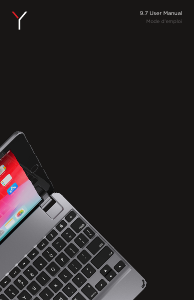
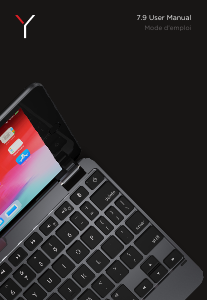
Manual Brydge 7.9 Keyboard

Need a manual for your Brydge 7.9 Keyboard? Below you can view and download the PDF manual for free in English. This product currently has 2 frequently asked questions, 1 comment and has 0 votes. If this is not the manual you want, please contact us.

Is your product defective and the manual offers no solution? Go to a Repair Café for free repair services.

Manual

Loading…
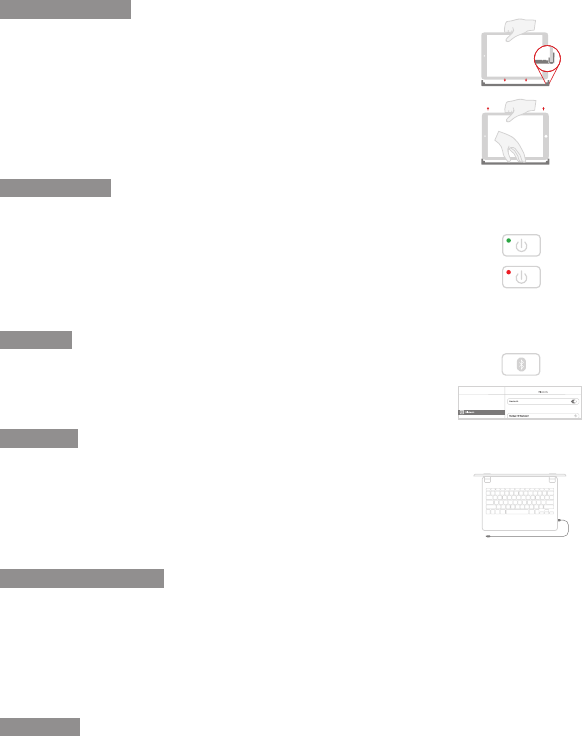
IMPORTANT
Supprimez les protecteurs d’écran non-Brydge avant de connecter votre clavier Brydge.
Cela garantira un ajustement parfait et éliminera toute pression inutile sur votre écran lors
de son insertion dans les charnières.
Placez votre clavier sans fil Brydge sur une surface plane et faites pivoter les charnières à
90°. Insérez votre iPad dans les charnières avec le bouton d’accueil à droite.
Si l’iPad est instable, retirez les cales et exercez une légère pression sur les charnières.
Répétez cette procédure jusqu’à ce que votre iPad soit maintenu fermement.
POUR RETIRER : assurez-vous de placer votre clavier sans fil Brydge sur une surface plane.
Placez votre main au dos du clavier et tirez un côté à la fois.
POUR ALLUMER : maintenez la touche marche/arrêt enfoncée pendant une seconde
jusqu’à ce que la DEL clignote verte.
POUR ÉTEINDRE : maintenez la touche marche/arrêt enfoncée pendant trois secondes
jusqu’à ce que la DEL clignote rouge.
REMARQUE : pour préserver la charge de la batterie, votre pavé tactile sans fil Brydge
entrera en mode veille après 20 minutes d’inactivité. Votre pavé tactile sans fil Brydge
entrera en mode veille lorsque les deux appareils sont fermés, comme un ordinateur
portable.
POUR JUMELER : maintenez la touche Bluetooth enfoncée pendant 3 secondes jusqu’à
ce que la DEL bleue clignote. Sur votre iPad, sous Paramètres > Bluetooth, sélectionnez
Brydge 7.9.
Une fois jumelé avec succès, la DEL s’éteindra.
REMARQUE : lorsque la batterie est inférieure à 15%, la fonction de rétro-éclairage des
touches sera désactivé pour préserver la charge de la batterie.
POUR CHARGER : insérez le câble de chargement dans le clavier et branchez l’autre
extrémité dans une prise de courant. Un voyant lumineux rouge fixe (DEL) indique que le
clavier sans fil Brydge est en cours de chargement.
Une fois le clavier complètement chargé, le voyant lumineux rouge s’éteindra. Le chargement
complet peut prendre jusqu’à trois heures.
Nous vous remercions d’avoir acheté un produit Brydge. Ce produit est accompagné d’une garantie matérielle limitée
d’un an aux conditions prévues dans ce document et sur www.brydge.com/warranty. Toute garantie Brydge ne peut
être transférée et est applicable seulement à l’utilisateur initial du produit. Les garanties ne s’appliquent pas aux produits
achetés auprès de vendeurs en ligne non-autorisés à vendre des produits de la marque Brydge. Pour bénéficier d’un
service sous garantie, visitez le site www.brydge.com/support. Une preuve d’achat peut être exigée pour vérifier l’éligibilité.
VOUS AVEZ DES QUESTIONS ? Visitez www.brydge.com/support
INSÉRER/RETIRER
ALIMENTATION
JUMELER
CHARGER
RACCOURCIS CLAVIER
GARANTIE
Copier
Commande + C
Coller
Commande + V
Couper
Commande + X
Souligner
Commande + U
Italique
Commande + I
Écran d’accueil
Commande + H
Changer d’application
Commande + Languette
Afcher le Dock
Commande + Option + D
Rechercher
Commande + Espace
Annuler
Commande + Z
Changer de Langue
ctrl + shift + barre d’espace (la barre d’espace vous permet de basculer entre les langues disponibles)
Connected
Settings
On
Download manual in English (PDF, 0.48 MB)
(Consider the environment and only print this manual if it is really necessary)

Loading…

Rating

Let us know what you think about the Brydge 7.9 Keyboard by leaving a product rating. Want to share your experiences with this product or ask a question? Please leave a comment at the bottom of the page.
Are you satisfied with the Brydge 7.9 Keyboard?
Yes No
Be the first to rate this product
0 votes

Join the conversation about this product

Here you can share what you think about the Brydge 7.9 Keyboard. If you have a question, first carefully read the manual. Requesting a manual can be done by using our contact form.

Jennifer 09-03-2025
Am unable to use Brydge keyboard with my Apple iPad the pop up keeps appearing on my screen & I only want the Brydge

reply | This was helpful (0)

More about this manual

We understand that it’s nice to have a paper manual for your Brydge 7.9 Keyboard. You can always download the manual from our website and print it yourself. If you would like to have an original manual, we recommend you contact Brydge. They might be able to provide an original manual. Are you looking for the manual of your Brydge 7.9 Keyboard in a different language? Choose your preferred language on our homepage and search for the model number to see if we have it available.

Specifications

Brand Brydge
Model 7.9
Category Keyboards
File type PDF
File size 0.48 MB

All manuals for Brydge Keyboards
More manuals of Keyboards

Frequently Asked Questions about Brydge 7.9 Keyboard

Our support team searches for useful product information and answers to frequently asked questions. If you find an inaccuracy in our frequently asked questions, please let us know by using our contact form.

The letters on the keyboard are not in the places that I am used to, why is that? Verified

Most keyboards use a QWERTY layout, standing for the first six letters on the keyboard. However, there are different keyboard layouts, matching the specific needs of a certain language. It is also possible that the keyboard keys have been swapped. Especially with older keyboards this is easy to do.

This was helpful (1365) Read more

What is the best way to clean my keyboard Verified

Never insert objects between the edges of the keys, as this will mainly push dirt in and damage the keyboard. It is best to clean the keyboard with compressed air while keeping the keyboard upside down. The top of the keys can be cleaned with a slightly damp cloth.

This was helpful (204) Read more
Manual Brydge 7.9 Keyboard

Related products

Related categories

×
Download