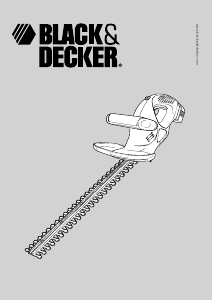
Manual Black and Decker GT534 Hedgecutter

Need a manual for your Black and Decker GT534 Hedgecutter? Below you can view and download the PDF manual for free in English. This product currently has 4 frequently asked questions, 0 comments and has 0 votes. If this is not the manual you want, please contact us.

Is your product defective and the manual offers no solution? Go to a Repair Café for free repair services.

Manual

Loading…

4
ENGLISH
Electrical safety
This tool is double insulated; therefore no earth wire
is required. Always check that the power supply
corresponds to the voltage on the rating plate.
Additional safety instructions for hedgetrimmers
Wear safety glasses or goggles when operating this
tool.
Wear gloves when operating this tool.
Wear ear protection when operating this tool.
Immediately disconnect the cable from the mains if
it is damaged or cut.
Do not expose the tool to rain or high humidity.
Keep the cable away from the blades while using this
tool.
If you have not used a hedgetrimmer before, preferably
seek practical instruction by an experienced user in
addition to studying this manual.
Never touch the blades while the tool is running.
Never attempt to force the blades to come to a standstill.
Do not put the tool down until the blades have come to a
complete standstill.
Regularly check the blades for damage and wear. Do not
use the tool when the blades are worn or damaged.
Take care to avoid hard objects (e.g. metal wire, railings)
when trimming. Should you accidentally hit any such
object, immediately switch the tool off, unplug it and
check for any damage.
Should the tool start to vibrate abnormally, immediately
switch it off and check for any damage.
If the tool stalls, immediately switch it off. Unplug the
tool before attempting to remove any obstructions.
After use, place the blade sheath supplied over the
blades. Store the tool, making sure that the blade is not
exposed.
Always ensure that all handles and guards are fitted
when using the tool. Never attempt to use an incomplete
tool or a tool with unauthorised modifications.
Never allow children to use the tool.
When operating the extending handle, hold the unit away
from your body and loose clothes.
Be aware of falling debris when cutting the higher sides
of a hedge.
Additional safety instructions for Australia and
New Zealand
This appliance is not intended for use by young or infirm
persons without supervision. Children must be supervised
to ensure they do not play with the appliance.
If the supply cord is damaged, it must be replaced by the
manufacturer or an authorised Black & Decker Service
Centre in order to avoid a hazard.
Features
This tool includes some or all of the following features.
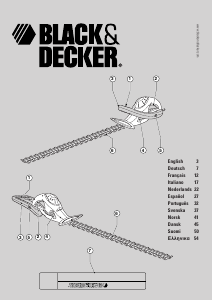
1. Handle switch
2. Trigger switch
3. Extending handle
4. Front handle release buttons
5. Rear handle release buttons
6. Blade
7. Blade sheath
This hedgetrimmer has the following features for your benefit:
Dual action blades for reduced vibration.
Laser cut and diamond ground blades for improved
cutting.
Extending handle for cutting the higher sides of hedges.
Use
Changing the position of the extending handle
Warning! Before changing the position of the extending
handle, make sure that the tool is switched off and unplugged.
Rotating the handle into the extended position
(fig. A1 & A2)
Your hedgetrimmer will reach you with the handle in the
forward position. To move the handle into the extended
position, proceed as follows:
Support the underside of the unit with one hand.
Simultaneously press the front handle release buttons (4)
with your thumb and middle finger and rotate the handle
(3) backward with your other hand.
Move the handle fully into the extended position. Make
sure the handle clicks and locks into place.
Rotating the handle into the forward position (fig. B1 & B2)
To move the handle from the extended into the forward
position, proceed as follows:
Support the underside of the unit with one hand.
Simultaneously press the rear handle release buttons (5)
with the thumb and index finger of your other hand and
rotate the handle (3) forward. As you move the handle out
of the extended position you will hear a click.
Move the handle fully into the forward position.
Download manual in English (PDF, 1.79 MB)
(Consider the environment and only print this manual if it is really necessary)

Loading…

Rating

Let us know what you think about the Black and Decker GT534 Hedgecutter by leaving a product rating. Want to share your experiences with this product or ask a question? Please leave a comment at the bottom of the page.
Are you satisfied with the Black and Decker GT534 Hedgecutter?
Yes No
Be the first to rate this product
0 votes

Join the conversation about this product

Here you can share what you think about the Black and Decker GT534 Hedgecutter. If you have a question, first carefully read the manual. Requesting a manual can be done by using our contact form.

More about this manual

We understand that it’s nice to have a paper manual for your Black and Decker GT534 Hedgecutter. You can always download the manual from our website and print it yourself. If you would like to have an original manual, we recommend you contact Black and Decker. They might be able to provide an original manual. Are you looking for the manual of your Black and Decker GT534 Hedgecutter in a different language? Choose your preferred language on our homepage and search for the model number to see if we have it available.

Specifications

Brand Black and Decker
Model GT534
Category Hedgecutters
File type PDF
File size 1.79 MB

All manuals for Black and Decker Hedgecutters
More manuals of Hedgecutters

Frequently Asked Questions about Black and Decker GT534 Hedgecutter

Our support team searches for useful product information and answers to frequently asked questions. If you find an inaccuracy in our frequently asked questions, please let us know by using our contact form.

How do I know my hedgecutter is blunt? Verified

When branches are being pulled instead of cut, the hedgecutter is blunt and needs to be sharpened.

This was helpful (348) Read more

How do I sharpen my hedgecutter blades? Verified

Sharpening your hedgecutter blades is important for maintaining the performance and efficiency of the tool. To sharpen the blades, you will need a file or sharpening stone specifically designed for the type of blade on your hedgecutter.

This was helpful (301) Read more

How do I lubricate my hedgecutter blades? Verified

Lubricating your hedgecutter blades will help to reduce friction and wear, prolonging the life of the tool. Use a high-quality lubricating oil specifically designed for hedgecutters and apply a small amount to the blades after each use.

This was helpful (147) Read more

How can I prevent rust from forming on my hedgecutter blades? Verified

Rust can cause damage to your hedgecutter blades, reducing their performance and lifespan. To prevent rust, clean and dry the blades thoroughly after each use and store them in a dry, clean place. You can also consider applying a protective coating, such as oil or a rust inhibitor, to the blades before storing them.

This was helpful (90) Read more
Manual Black and Decker GT534 Hedgecutter

Related products

Related categories

×
Download