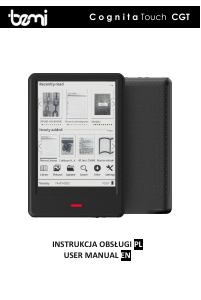
Manual Bemi Cognita Light CGL E-Reader

Need a manual for your Bemi Cognita Light CGL E-Reader? Below you can view and download the PDF manual for free in English. This product currently has 2 frequently asked questions, 1 comment and has 0 votes. If this is not the manual you want, please contact us.

Is your product defective and the manual offers no solution? Go to a Repair Café for free repair services.

Manual

Loading…
3
Uruchamianie urządzania - Aby włączyć wyłączone urządzenie należy nacisnąć i
przytrzymać przycisk zasilania przez 5 sekund. Aby wyłączyć włączone urządzenie
należy powtórzyć ten proces.
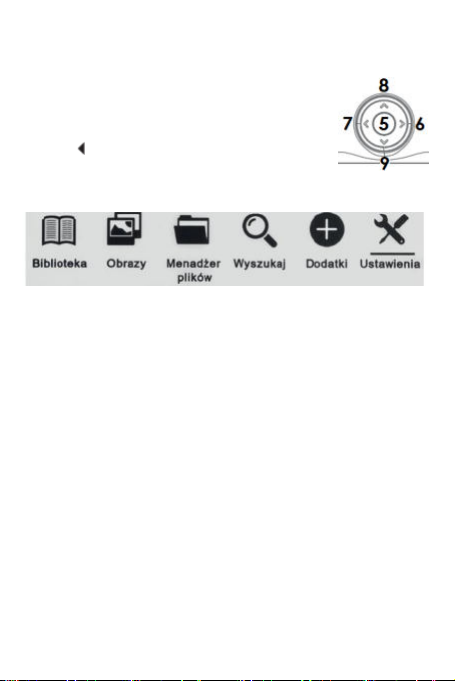
Sterowanie i nawigacja - Poruszanie się po funkcjach urządzenia odbywa się za
pomocą klawiszy wymienionych w sekcji „Przyciski i złącza”
tej instrukcji. Za pomocą przycisków numer 6, 7, 8 i 9
przechodzi się pomiędzy opcjami/plikami oraz podczas
czytania zmienia się stronę. Obecnie zaznaczona opcja jest
podkreślona. obecnie ustawiona opcja jest oznaczona
symbolem . Aby wybrać, zatwierdzić lub przejść dalej, należy
nacisnąć przycisk numer 5 Potwierdzenie wyboru.
Ekran główny - Ostatnio czytane - wyświetla 3 ostatnio otworzone e-booki. Nowe-
wyświetla 4 ostatnio dodane e-booki.
Biblioteka - Umożliwia dostęp do wszystkich e-booki urządzenia, zarówno w
pamięci wewnętrznej jak i na karcie pamięci jeśli została umieszczona w czytniku.
Po lewej stronie będzie wyświetlony tytuł, a po prawej format pliku. W podmenu
zakładki Biblioteka, można wyświetlić listę ulubionych e-booków, wyszukać
książki, przesortować po tytule, autorze, ostatnio czytanych, nowych oraz zmienić
sposób wyświetlania plików w Bibliotece na lista lub miniaturki (okładka).
1.Podmenu podczas czytania. Opcje podmenu mogą zostać wyświetlone podczas
czytania e-booka. Podczas gdy e-book jest otwarty, należy nacisnąć przycisk Menu
aby wyświetlić listę możliwych opcji. Uwaga: opcje zawarte w podmenu podczas
czytania różnią się podczas czytania różnych formatów plików. Nie każda funkcja
jest dostępna dla każdego formatu pliku. Możliwe funkcje:
1.1.Dodaj zakładkę — dodawanie zakładki w obecnie otwartej książce.
1.2.Zakładki — wyświetla zapisane zakładki.
1.3.Spis treści — wyświetla spis treści, jeśli jest dostępny w danym pliku; (funkcja
niedostępna w pliku w formacie .txt).
1.4.Dodaj do ulubionych dodaj obecnie otwarty plik do listy ulubionych.
1.5.Idź do strony — wpisz numer strony do której chcesz bezpośrednio przejść.
1.6.Wyszukaj wyszukiwanie wybranych słów i aktualnie otwartej książce.
1.7.Zoom zwiększ/zmniejsz widok (funkcja dostępna tylko w formacie .pdf).
1.8.Rozmiar czcionki zwiększ / zmniejsz rozmiar czcionki obecnie czytanego
tekstu (funkcja nie jest w pliku w formacie .pdf).
1.9.Typ czcionki zmień rodzaj czcionki (funkcja dostępna jedynie w plikach w
formacie .txt/.html/.fb2/.rtf/.mobi).
1.10.Odstęp między liniami — dostosuj odstęp między liniami (funkcja dostępna
jedynie w plikach w formacie .txt/.html/.fb2/.rtf/.mobi).
1.11.Margines zmiana rozmiaru marginesu w pliku.
1.12.Tekst użytkownik może zmienić sposób wyświetlania pliku w formacie
.pdf pomiędzy widokiem oryginalnym (wył. oryginał) oraz tylko tekst (wł.
Download manual in English (PDF, 0.51 MB)
(Consider the environment and only print this manual if it is really necessary)

Loading…

Rating

Let us know what you think about the Bemi Cognita Light CGL E-Reader by leaving a product rating. Want to share your experiences with this product or ask a question? Please leave a comment at the bottom of the page.
Are you satisfied with the Bemi Cognita Light CGL E-Reader?
Yes No
Be the first to rate this product
0 votes

Join the conversation about this product

Here you can share what you think about the Bemi Cognita Light CGL E-Reader. If you have a question, first carefully read the manual. Requesting a manual can be done by using our contact form.

Lia Vergouw 19-04-2025
Just purchased, and looks good. Can't find a Dutch complete manual anywhere. Would like to know how I can adjust the font size

reply | This was helpful (0) (Translated by Google)

More about this manual

We understand that it’s nice to have a paper manual for your Bemi Cognita Light CGL E-Reader. You can always download the manual from our website and print it yourself. If you would like to have an original manual, we recommend you contact Bemi. They might be able to provide an original manual. Are you looking for the manual of your Bemi Cognita Light CGL E-Reader in a different language? Choose your preferred language on our homepage and search for the model number to see if we have it available.

Specifications

Brand Bemi
Model Cognita Light CGL
Category E-Readers
File type PDF
File size 0.51 MB

All manuals for Bemi E-Readers
More manuals of E-Readers

Frequently Asked Questions about Bemi Cognita Light CGL E-Reader

Our support team searches for useful product information and answers to frequently asked questions. If you find an inaccuracy in our frequently asked questions, please let us know by using our contact form.

What is an ePub file? Verified

ePub stands for 'electronic publication' and is a file format for eBooks. The ePub format is the standard file format concerning eBooks, but be aware: this is not the case for eBooks and eReaders from Amazon.

This was helpful (73) Read more

Are E-Readers better for my eyes than LCD screens? Verified

In contrast to the screens found on laptops, smartphones, and tablets, e-readers are more beneficial for our eyes. E-readers utilize e-ink, a paper-like display technology that replicates ink on a page. This results in significantly less eye strain compared to reading from LCD screens, as it doesn't decrease our blink rate. It's advisable to avoid using an e-reader too close to bedtime since these devices emit blue light, which can have adverse effects on your sleep.

This was helpful (3) Read more
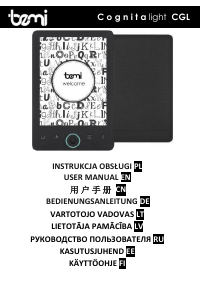
Manual Bemi Cognita Light CGL E-Reader

Related products

Related categories

×
Download