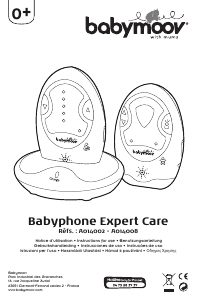
Manual Babymoov A014002 Expert Care Baby Monitor

Need a manual for your Babymoov A014002 Expert Care Baby Monitor? Below you can view and download the PDF manual for free in English. This product currently has 2 frequently asked questions, 0 comments and has 0 votes. If this is not the manual you want, please contact us.

Is your product defective and the manual offers no solution? Go to a Repair Café for free repair services.

Manual

Loading…
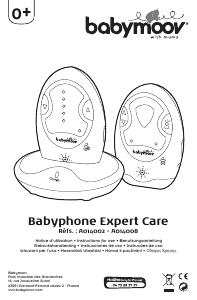
BABY MONITOR EXPERT CARE • Instruction Manual
10
CONTROLS LAYOUT
Receiver
9. Visual level meter / Out-of-range indicator
10. Volume down
11. Vibration indicator
12. Speaker
13. Volume up
14. Power On/Off and vibration switch
15. Charging contacts
Transmitter
1. Nightlight
2. Microphone sensitivity adjustment
3. Transmit indicator
4. Microphone
5. Nightlight VOX control button
6. Power On-Off and Nightlight switch
7. Power on / Battery low indicator
8. DC Jack
Charger
16. Charging pins
17. DC Jack
18. Charging Indicator
Transmitter and receiver
19. Channel switch
20. Digital codes switches
NB.: If you notice any interference when in operation, change channel or alter the numeric code combination.
Make sure that you always keep the same settings for the transmitter and receiver.
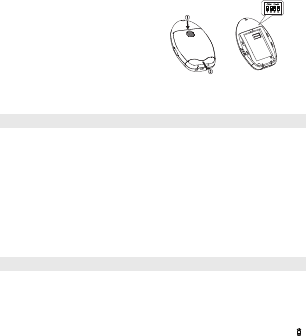
Receiver
Press the latch cover and slide it to gain access to
the battery compartment. Remove the battery.
Proceed as for the transmitter to set the channel and
numeric code.
Make sure that the settings for the transmitter and
receiver are exactly the same.
OPERATION
A / Transmitter
• Set the power ON/OFF switch (6) to ON position to turn on the unit. The power on indicator (7) will light
up steady green.
• Place the transmitter about 1 m from the cradle, directing the microphone (4) towards the baby.
• Adjust the sensitivity of the microphone by using button (2): press upwards to increase sensitivity and
downwards to reduce it (there are 5 levels).
• As soon as the transmitter detects a sound, the transmit indicator lights up red.
• The night light (1) can be set permanently ON by moving the power ON/OFF switch (6) to position .
The night light can also be set to be VOX (voice activated) by momentarily pressing the button 5. Under
VOX mode, the night light will be switched on once the microphone detects a sound and automatically
goes off a few seconds after the microphone stops picking up any sound.
• The condition of the batteries is shown by the battery low indicator “Power” (7). When the battery power
is being consumed, the indicator starts flashing.
B / Reveiver
• Set the power ON/OFF switch (14) to ON position to turn on the unit. The power on indicator (7) will light
up steady green.
• Place the receiver at a reasonable distance away from the transmitter to avoid feedback. Too close a
distance will create a screeching sound.
• Once the unit receives a signal from the transmitter, the LED of the visual level meter (9) light up. The
louder the baby’s voice, the more number of LED will be lighted up.
• The loudspeaker volume can be adjusted by using buttons (10) and (13). Each time you press on one of
these buttons, you will hear a “beep” whose volume corresponds to the level you have just selected. If
you press button 10 to its lowest level, you will no longer hear a beep which means that your receiver is
in mute mode.
Download manual in English (PDF, 5.79 MB)
(Consider the environment and only print this manual if it is really necessary)

Loading…

Rating

Let us know what you think about the Babymoov A014002 Expert Care Baby Monitor by leaving a product rating. Want to share your experiences with this product or ask a question? Please leave a comment at the bottom of the page.
Are you satisfied with the Babymoov A014002 Expert Care Baby Monitor?
Yes No
Be the first to rate this product
0 votes

Join the conversation about this product

Here you can share what you think about the Babymoov A014002 Expert Care Baby Monitor. If you have a question, first carefully read the manual. Requesting a manual can be done by using our contact form.

More about this manual

We understand that it’s nice to have a paper manual for your Babymoov A014002 Expert Care Baby Monitor. You can always download the manual from our website and print it yourself. If you would like to have an original manual, we recommend you contact Babymoov. They might be able to provide an original manual. Are you looking for the manual of your Babymoov A014002 Expert Care Baby Monitor in a different language? Choose your preferred language on our homepage and search for the model number to see if we have it available.

Specifications

Brand Babymoov
Model A014002 Expert Care
Category Baby Monitors
File type PDF
File size 5.79 MB

All manuals for Babymoov Baby Monitors
More manuals of Baby Monitors

Frequently Asked Questions about Babymoov A014002 Expert Care Baby Monitor

Our support team searches for useful product information and answers to frequently asked questions. If you find an inaccuracy in our frequently asked questions, please let us know by using our contact form.

Why is the range of my baby monitor less than the brochure/manual describes? Verified

Brands tend to state a range that is based on use without obstacles like walls or a distance that covers multiple floors. If the range is insufficient, try to place the baby monitor so that it has minimum obstacles.

This was helpful (685) Read more

When listening to my baby I can clearly hear breathing, but the baby monitor doesn't let me hear this. Why is that? Verified

This is due to the sensitivity of the baby monitor. Adjust the settings to be more sensitive and pick up quieter sounds.

This was helpful (374) Read more
Manual Babymoov A014002 Expert Care Baby Monitor

Related products

Related categories

×
Download