Manual AVG Internet Security (2013)

Need a manual for your AVG Internet Security (2013)? Below you can view and download the PDF manual for free in English. This product currently has 0 frequently asked questions, 0 comments and has 0 votes. If this is not the manual you want, please contact us.

Is your product defective and the manual offers no solution? Go to a Repair Café for free repair services.

Manual

Loading…
7
3. AVG Installation Process
To install AVG Internet Security 2013 on your computer, you need to get the latest installation file. To make
sure you are installing the up-to-date version of AVG Internet Security 2013, it is recommended that you
download the installation file from the AVG website (http://www.avg.com/). The Support / Downloads section
provides a structured overview of the installation files for each AVG edition.
If you are not sure which files you need to download and install, you may want to use the Select product
service at the bottom of the web page. After you answer three simple questions, this service defines the exact
files you need. Press the Continue button to get redirected to a complete list of download files customized for
your personal needs.
Once you have downloaded and saved the installation file on your hard disk, you can launch the installation
process. The installation is a sequence of simple and easy to understand dialogs. Each dialog briefly
describes what do at each step of the installation process. We offer a detailed explanation of each dialog
window below:
3.1. Welcome: Language Selection
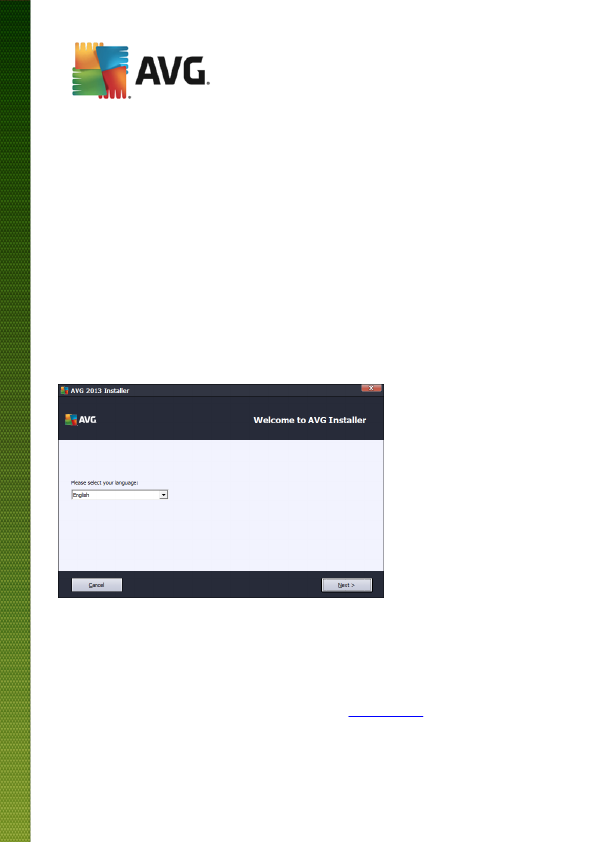
The installation process starts with the Welcome to AVG Installer dialog:
In this dialog you can select the language used for the installation process. Click the combo box to roll down
the language menu. Select the desired language, and the installation process will proceed further in the
language of your choice.
Attention: At the moment you are only selecting the language of the installation process. The AVG
Internet Security 2013 application will be installed in the selected language, and in English which is
always installed automatically. However, it is possible to have more languages installed and to work
with AVG Internet Security 2013 in any of these. You will be invited to confirm your full selection of
alternative languages in one of following setup dialogs named Custom Options.
Download manual in English (PDF, 3.17 MB)
(Consider the environment and only print this manual if it is really necessary)

Loading…

Rating

Let us know what you think about the AVG Internet Security (2013) by leaving a product rating. Want to share your experiences with this product or ask a question? Please leave a comment at the bottom of the page.
Are you satisfied with the AVG Internet Security (2013)?
Yes No
Be the first to rate this product
0 votes

Join the conversation about this product

Here you can share what you think about the AVG Internet Security (2013). If you have a question, first carefully read the manual. Requesting a manual can be done by using our contact form.

More about this manual

We understand that it’s nice to have a paper manual for your AVG Internet Security (2013). You can always download the manual from our website and print it yourself. If you would like to have an original manual, we recommend you contact AVG. They might be able to provide an original manual. Are you looking for the manual of your AVG Internet Security (2013) in a different language? Choose your preferred language on our homepage and search for the model number to see if we have it available.

Specifications

Brand AVG
Model Internet Security (2013)
Category Software
File type PDF
File size 3.17 MB

All manuals for AVG Software
More manuals of Software
Manual AVG Internet Security (2013)

Related products

Related categories

×
Download