Manual AVG Internet Security (2013)

Need a manual for your AVG Internet Security (2013)? Below you can view and download the PDF manual for free in English. This product currently has 0 frequently asked questions, 0 comments and has 0 votes. If this is not the manual you want, please contact us.

Is your product defective and the manual offers no solution? Go to a Repair Café for free repair services.

Manual

Loading…
10
Cancel - click to exit the setup process immediately; AVG Internet Security 2013 will not be
installed!
Back - click to go one step back to the previous setup dialog.
Next - click to continue the installation and go one step further.
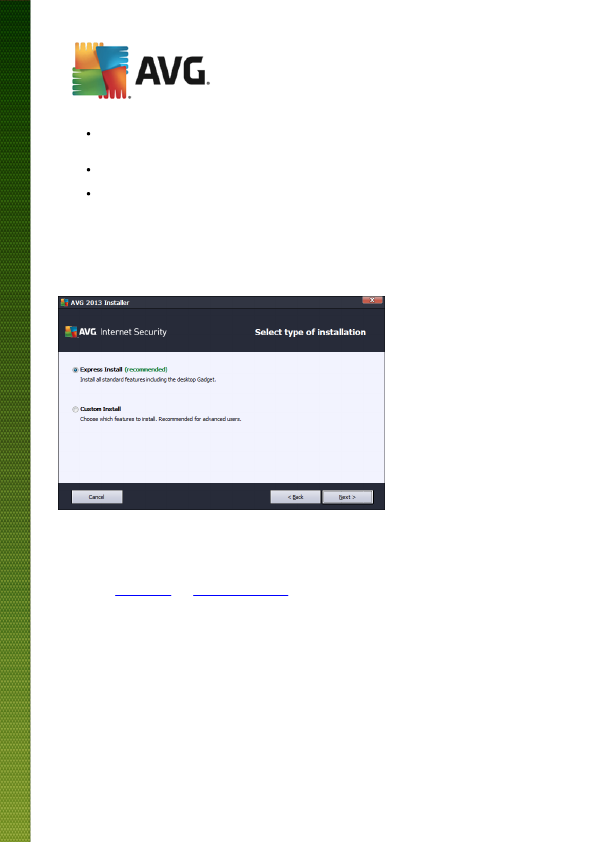
3.4. Select type of installation
The Select type of installation dialog offers the choice of two installation options: Express and Custom
Install:
Express installation
For most users, it is highly recommended that you keep the standard Express installation. This way you
install AVG Internet Security 2013 in fully automatic mode with settings predefined by the program vendor,
including the AVG Gadget, the AVG Security Toolbar, and having configured the AVG Secure Search as the
default search provider. This configuration provides maximum security combined with the optimal use of
resources. In the future, if the need arises to change the configuration, you will always have the option of doing
so directly in the AVG Internet Security 2013 application.
Press the Next button to proceed to the following dialog of the installation process.
Custom installation
Custom Install should only be used by experienced users who have a valid reason to install AVG Internet
Security 2013 with non-standard settings; e.g. to fit specific system requirements. If you decide for this
option, a new section called Destination Folder appears in the dialog. Here, you are supposed to specify the
location where AVG Internet Security 2013 should be installed. By default, AVG Internet Security 2013 will
be installed to the program files folder located on drive C:, as stated in the text field in the dialog. If you want
Download manual in English (PDF, 3.17 MB)
(Consider the environment and only print this manual if it is really necessary)

Loading…

Rating

Let us know what you think about the AVG Internet Security (2013) by leaving a product rating. Want to share your experiences with this product or ask a question? Please leave a comment at the bottom of the page.
Are you satisfied with the AVG Internet Security (2013)?
Yes No
Be the first to rate this product
0 votes

Join the conversation about this product

Here you can share what you think about the AVG Internet Security (2013). If you have a question, first carefully read the manual. Requesting a manual can be done by using our contact form.

More about this manual

We understand that it’s nice to have a paper manual for your AVG Internet Security (2013). You can always download the manual from our website and print it yourself. If you would like to have an original manual, we recommend you contact AVG. They might be able to provide an original manual. Are you looking for the manual of your AVG Internet Security (2013) in a different language? Choose your preferred language on our homepage and search for the model number to see if we have it available.

Specifications

Brand AVG
Model Internet Security (2013)
Category Software
File type PDF
File size 3.17 MB

All manuals for AVG Software
More manuals of Software
Manual AVG Internet Security (2013)

Related products

Related categories

×
Download