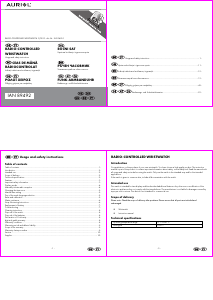
Manual Auriol 2-LD-3493-1 Watch

Need a manual for your Auriol 2-LD-3493-1 Watch? Below you can view and download the PDF manual for free in English. This product currently has 7 frequently asked questions, 1 comment and has 5 votes with an average product rating of 20/100. If this is not the manual you want, please contact us.

Is your product defective and the manual offers no solution? Go to a Repair Café for free repair services.

Manual

Loading…
-
3
-
Features
Radio controlled time
Digital date, time and seconds display
Display of the day of the week in English or German
Time zone selection (3 time zones)
Radio reception indicator
Important safety information
- Batteries
Insert the batteries/ rechargeable batteries in the correct polarity. Don’t try to recharge non-rechargeable batteries
and under no circumstances throw them into fire. Danger of explosion.
Do not use unequal batteries (old and new, Alkaline and carbon, etc.) simultaneously. If you will not use the
device for a long time, remove the batteries and store the device in a dry and dust-free place. Improper use of
batteries may cause an explosion or leakage. If the batteries have leaked, use gloves and clean the wristwatch
thoroughly with a dry cloth.
- The wristwatch should not be in the hands of children
Never let children use electrical devices unsupervised. Children can’t always recognize the possible dangers
properly. Batteries/ rechargeable batteries can be life threatening when swallowed. Store the batteries where they
cannot be reached by small children. If a battery is swallowed, medical aid must be sought immediately.
Also keep the packaging foils away from children. Danger of suffocation.
-
4
-
Display modes
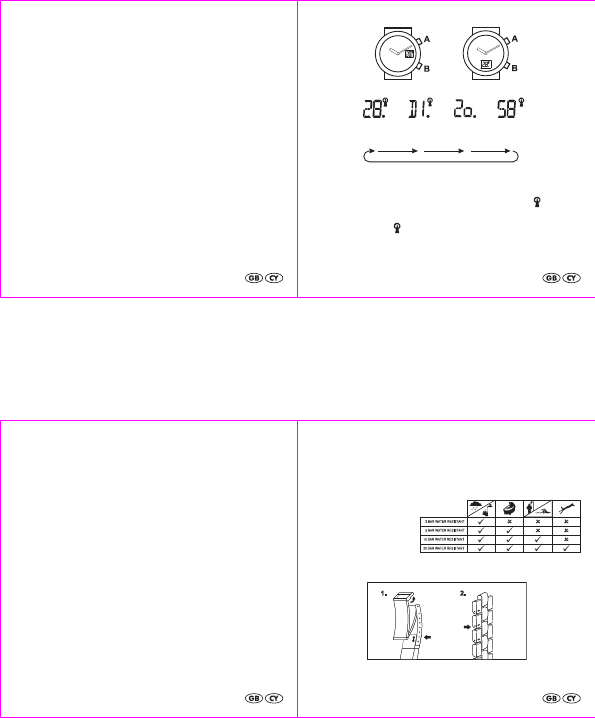
Press A to select one of the display modes of the wrist watch:
Manually initiate radio reception
Radio time signal reception can be started manually.
Press A to select the date display mode.
Press and hold A for 3 seconds. The reception is started and the radio reception control symbol will appear
blinking on the display. Radio reception takes between 3 and 9 minutes to complete and can be interrupted by
pressing any button.
The radio reception control symbol will appear continuously on the display while the reception is successful.
date
day of
the week
zone
seconds
-
5
-
Changing the time zone
Press A to select time zone display mode.
Press and hold B for 3 seconds. Press A to select the correct time zone:
Uk = Greenwich Mean Time (UTC), GE = Central European Time (UTC+1), GR = Eastern Europe (UTC+2).
Confirm your selection by pressing B. The hands will automatically move to the appropriate time.
Manual time setting
Only use the manual time setting if radio signal reception is not possible. Should your watch display the incorrect
time, please proceed as described in the chapter "Troubleshooting" at the end of this manual.
Press A to select the date display mode. Press and hold B for 3 seconds.
The hours will blink on the display. Set the hours by pressing A and confirm your setting by pressing B.
The minutes will blink on the display. Set the minutes by pressing A and confirm your setting by pressing B.
The hands will automatically move to the appropriate time.
Day of the week language selection
Press A to select the day of the week display mode. Press and hold B for three seconds.
The set language will blink on the display. Select your preferred language by pressing A: En = English, DE =
German.
Confirm your selection by pressing B.
Reset and calibration
Replacing the battery, strong magnetic fields or strong vibrations may cause the hands to lose synchronisation with
the internal time. In this case the hands must be recalibrated. Ensure that the watch is displaying the date. If
necessary, repeatedly press A until the date appears.
Press and hold A and B for 5 seconds, until 'HP' appears blinking on the display.
Calibrating the minute hand
To set the minute hand exactly to the 12 o'clock (60 minute) position:
Press and hold A. The minute hand will move forward and will continue to move until it is stopped by
again pressing A. Stop the minute hand shortly before it reaches the 12 o'clock position.
Repeatedly press A briefly- the minute hand will move by one sixth of a minute each time A is
pressed. Move the minute hand exactly to the 12 o'clock position.
Now press B to continue to the calibration of the hour hand.
-
6
-
Calibrating the hour hand
A digit will appear blinking on the display. This digit must match the current position of the hour hand. Do not set the
actual current time! For example: If the hour hand is at the 5 o'clock position, the display must also show "5".
Repeatedly press A to adjust the digit in the display to match the position of the hour hand.
Briefly press B to complete the setting process.
The watch will now start radio reception.
Water resistance
Water resistant up to 3 bar. The bar value
specifies the atmospheric overpressure
which is applied during testing (DIN
8310).
Strap Shortening Instructions
Your wristwatch strap may be shortened in two ways.
Download manual in English (PDF, 0.84 MB)
(Consider the environment and only print this manual if it is really necessary)

Loading…

Rating

Let us know what you think about the Auriol 2-LD-3493-1 Watch by leaving a product rating. Want to share your experiences with this product or ask a question? Please leave a comment at the bottom of the page.
Are you satisfied with the Auriol 2-LD-3493-1 Watch?
Yes No
20%
80%
5 votes

Join the conversation about this product

Here you can share what you think about the Auriol 2-LD-3493-1 Watch. If you have a question, first carefully read the manual. Requesting a manual can be done by using our contact form.

Nicolae Capsizu 18-07-2021
I can't install the Auriol2-ld540-3 time and hour clock

reply | This was helpful (0) (Translated by Google)

More about this manual

We understand that it’s nice to have a paper manual for your Auriol 2-LD-3493-1 Watch. You can always download the manual from our website and print it yourself. If you would like to have an original manual, we recommend you contact Auriol. They might be able to provide an original manual. Are you looking for the manual of your Auriol 2-LD-3493-1 Watch in a different language? Choose your preferred language on our homepage and search for the model number to see if we have it available.

Specifications

Brand Auriol
Model 2-LD-3493-1
Category Watches
File type PDF
File size 0.84 MB

All manuals for Auriol Watches
More manuals of Watches

Frequently Asked Questions about Auriol 2-LD-3493-1 Watch

Our support team searches for useful product information and answers to frequently asked questions. If you find an inaccuracy in our frequently asked questions, please let us know by using our contact form.

A battery in my device is oxidized, can I still safely use it? Verified

Ja, the device can still be safely used. Firstly, remove the oxidizd battery. Never use bare hands to do this. Then clean the battery compartment with a cotton swab dipped in vinegar or lemon juice. Let it dry and insert new batteries.

This was helpful (942) Read more

My mechanical watch runs fast, what can I do? Verified

This might be caused by exposure to a magnetic field. It can be solved by a demagnetisation process performed by a professional watchmaker.

This was helpful (880) Read more

What do AM and PM stand for? Verified

AM stands for Ante Meridiem and indicates that the time is before midday. PM stands for Post Meridiem and indicates that the time is past midday.

This was helpful (756) Read more

What is the model number of my Auriol product? Verified

Although some Auriol products have an alternative model number, all of them have an IAN number with which the product can be identified.

This was helpful (700) Read more

What is a 'Chronograph'? Verified

A 'Chronograph' is literally a 'writer of time'. The term is used to describe clocks and watches that tell the time of day as well as measure a certain period of time, like a stopwatch.

This was helpful (660) Read more

What is GMT? Verified

GMT stands for Greenwich Mean Time (sometimes called UTC, standing for Coordinated Universal Time). It is the time for the longitude 0, that passes through Greenwich near London.

This was helpful (501) Read more

What is a quartz movement? Verified

Watches and clocks with a quartz movement are driven by a battery. This sends an electric current through quartz crystals that will vibrate. These vibrations are passed on to the movement. Because the vibrations have a fixed frequency, watches and clocks with a quartz movement are extremely precise.

This was helpful (483) Read more
Manual Auriol 2-LD-3493-1 Watch

Related products

Related categories

×
Download