Manual Alaska BM 2600 Bread Maker

Need a manual for your Alaska BM 2600 Bread Maker? Below you can view and download the PDF manual for free in English. This product currently has 2 frequently asked questions, 1 comment and has 1 vote with an average product rating of 100/100. If this is not the manual you want, please contact us.

Is your product defective and the manual offers no solution? Go to a Repair Café for free repair services.

Manual

Loading…
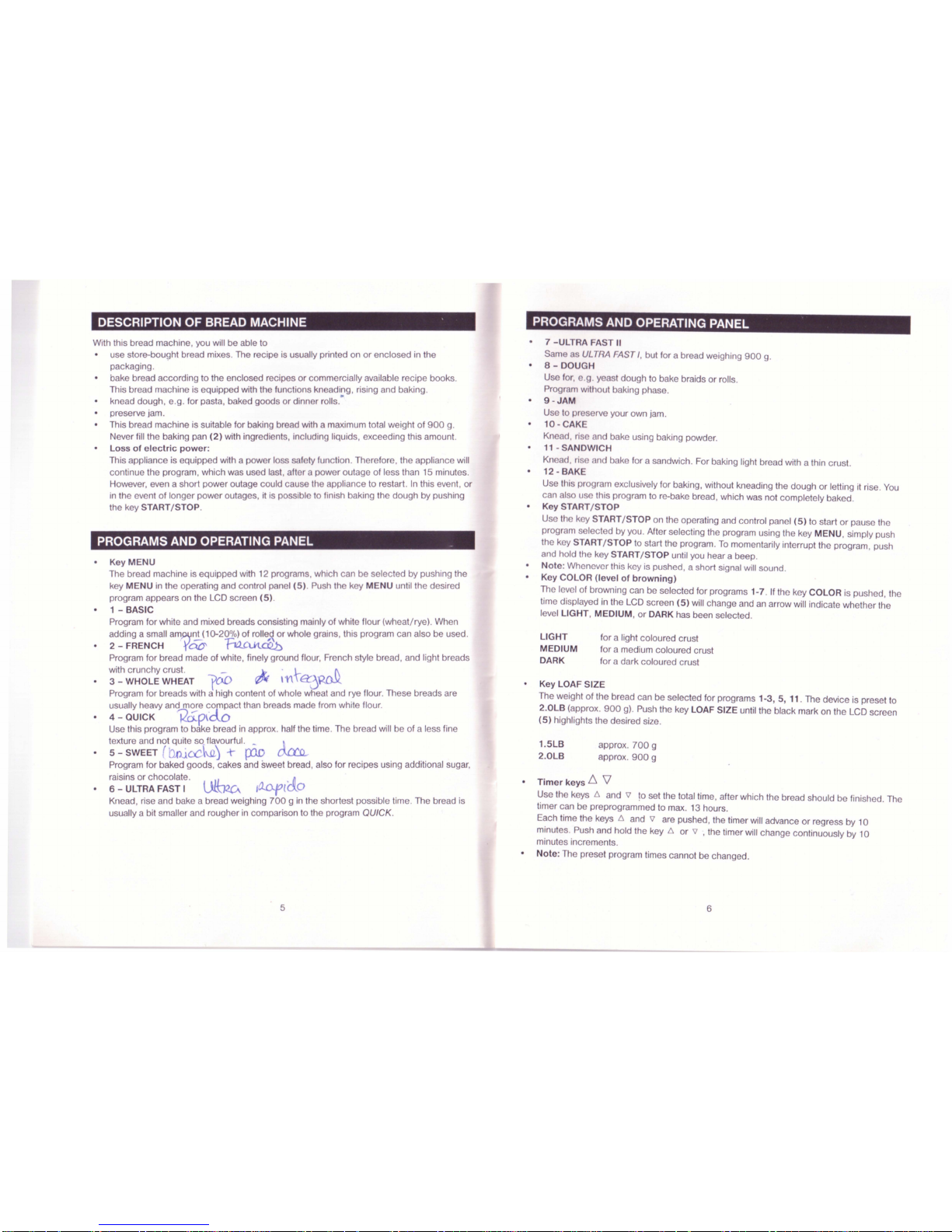
DESCRIPTION OF BREAD MACHINE .
PROGRAMS AND OPERATING PANEL
Key LOAF SIZE
The weight of the bread can be selected for programs 1-3, 5, 11. The device is preset to
2
.0LB
(approx.
900
g). Push the key LOAF SIZE until the black mark on the LCD screen
(5)
highlights the desired size.
Timer
keys 6 \1
Use the keys 6 and 'i1 to set the total time, after which the bread should be finished . The
timer can be preprogrammed to max. 13 hours.
Each time the keys
6 and 'i1 are pushed, the timer will advance or regress by 10
minutes. Push and hold the key or
'i1
,the
timer will change continuously by 10
minutes increments.
Note
: The preset program times cannot be changed.
7 - ULTRA FAST II
Same
c s ULTRA FAST /, but for a bread weighing
900
g.
8 - DOUGH
Use for, . . y st dough to bake braids or rolls.
Program without baking phase.
9
-JAM
Use to pr s rve your own jam.
10 - CAK
Kn ad, ri and
bake using baking powder.
11 - SANDWICH
Kn ad, ri and b ke for a sandwich. For baking light bread with a thin crust.
12 - BAK
Use this program exclusively for baking, without kneading the dough or letting it rise. You
can also
1I this program to re-bake bread, which was not completely baked.
Key START
/STOP
Use th k y STAR
T/
STOP on the operating and control panel
(5)
to start or pause the
program s I ct d by you. After selecting the program using the key MENU , simply push
the key STAR
T/
STOP to start the program. To momentarily interrupt the program , push
and hold the key STAR
T/
STOP until you hear a beep.
Note: Whenever this key is pushed , a short signal will sound.
Key COLOR (level of
browning)
The level of browning can be selected for programs 1-7. If the key COLOR is pushed , the
time displayed in the LCD screen
(5)
will change and an arrow will indicate whether the
level LIGHT, MEDIUM, or DARK has been selected.
With this bread machine, you will be able to
use store-bought bread mixes. The recipe is usually printed on or enclosed in the
packaging.
bake bread according to the enclosed recipes or commercially available recipe books .
This bread machine is equipped with the functions kn ading, rising and baking.
knead dough, e.g. for pasta, baked goods or dinner rolls.
preserve jam.
This bread machine is suitable for baking bread with a maximum total weight of
900
g.
Never fill the baking pan
(2)
with ingredients, including liquids, exceeding this amount.
Loss
of electric
pow
er:
This appliance is equipped with a power loss saf ty function. Therefore, the appliance will
continue the program, which was used last, after power outage of less than 15 minutes.
However, even a short power outage could caus th appliance to restart. In this event, or
in the event of longer power outages, it is possi I to finish aking the dough by pushing
the key STAR
T/
STOP.
PROGRAMS AND OPERATING PANEL
Key MENU
The bread machine is equipped with 12 programs, which can be selected by pushing the
key MENU in the operating and control panel (5). Push the k y M NU until the desired
program appears on the LCD screen
(5)
.
1 - BASIC
Program for white and mixed breads consisting mainly of white flour (wheat/rye). When
adding a small
am5?V'2!.J1D-20
%)of
rolle
,~
or whole grains, this program can also be used.
2 - FRENCH
t'ao'
"F0-CUtCQb
Program for bread made of white, finely ground flour, French style bread, and light breads
with crunchy crust. _
3 - WHOLE WHEAT
700
'V\ a:
Program for breads with a high content of whole wheat and rye flour. These breads are
usually heavy and more
c0p1pact than breads made from white flour.
4 - QUICK
'Rcip~dO
. . .
Use this program to bake bread in approx. half the time. The bread will be of a less fine
texture and not quite so flavourful. _
5 - SWEET
t- .
h.a)
p1D
Program for baked goods, cakes and sweet bread, also for recipes using additional sugar,
raisins or chocolate.
I
LJL~_
6 - ULTRA FAST I V(\J<(.A
I~l
'
0
Knead, rise and bake a bread weighing
700
g in the shortest possible time. The bread is
usually a bit smaller and rougher in comparison to the program
QUICK.
LIGHT
MEDIUM
DARK
1
.5LB
2
.0LB
for a light coloured crust
for a medium coloured crust
for a dark coloured crust
approx.
700
g
approx.
900
g
5
6
Download manual in English (PDF, 8.77 MB)
(Consider the environment and only print this manual if it is really necessary)

Loading…

Rating

Let us know what you think about the Alaska BM 2600 Bread Maker by leaving a product rating. Want to share your experiences with this product or ask a question? Please leave a comment at the bottom of the page.
Are you satisfied with the Alaska BM 2600 Bread Maker?
Yes No
100%
0%
1 vote

Join the conversation about this product

Here you can share what you think about the Alaska BM 2600 Bread Maker. If you have a question, first carefully read the manual. Requesting a manual can be done by using our contact form.

More about this manual

We understand that it’s nice to have a paper manual for your Alaska BM 2600 Bread Maker. You can always download the manual from our website and print it yourself. If you would like to have an original manual, we recommend you contact Alaska. They might be able to provide an original manual. Are you looking for the manual of your Alaska BM 2600 Bread Maker in a different language? Choose your preferred language on our homepage and search for the model number to see if we have it available.

Specifications

Brand Alaska
Model BM 2600
Category Bread Makers
File type PDF
File size 8.77 MB

All manuals for Alaska Bread Makers
More manuals of Bread Makers

Frequently Asked Questions about Alaska BM 2600 Bread Maker

Our support team searches for useful product information and answers to frequently asked questions. If you find an inaccuracy in our frequently asked questions, please let us know by using our contact form.

Can I clean the baking tin of my bread maker with a scourer? Verified

No. Most bread makers have a baking tin with a non-stick layer that can be damaged by using a scourer or abrasive cleaner. Only use the soft side of a scourer or a wet wipe.

This was helpful (691) Read more

Why do I need to remove the tray before adding ingredients? Verified

This is to prevent ingredients from falling on a heating element. They might burn and cause smoke.

This was helpful (667) Read more
Manual Alaska BM 2600 Bread Maker

Related products

Related categories

×
Download