2
Set the clock
TO SET THE CLOCK FOR THE FIRST TIME
1. You must switch off the radio before you set the clock.
2. Press and hold the “TIME SET” button until the display
begins to blink then release the button.
3. Press the Hour and Minute button to adjust the hour and
minute respectively.
4. Press the “TIME SET” button once to confirm the time
set.
Note: in future you can also adjust the time by pressing and
holding the ‘TIME SET’ Button for 2 seconds in clock mode
(radio off). The hour and minute digits will start to flash.
Then you can follow the step 3 to step 4 to adjust the time.
3
Use the alarm
TO SET THE ALARM
You can set two alarms (ALARM 1 & 2) with the following
steps:
1. Turn the unit to Clock mode (radio off).
2. Press and hold the Alarm 1 Button for 2 seconds. The
hour and minute digits will start to flash.
3. Press the Hour Button to adjust the hour.
4. Press the Minute Button to adjust the minute.
5. Press the Alarm 1 Button for confirmation.
6. Press the Alarm 1 Button for selection of how you want to
be awakened.
• A LED lights up at Clock symbol means a buzzer
sounds when the alarm time is reached.
• A LED lights up at Music Note symbol means
the radio will be switched on at the last set station
when the alarm time is reached.
7. You can turn off the alarm by pressing the Alarm 1 Button
repeatedly until no LED lights up at the symbols.
Note: you can set the ALARM 2 by repeating the above
steps with the Alarm 2, Hour and Minute Button.
TO REVIEW THE ALARM
1. After the alarm has been set, you can review the alarm
time by pressing and holding the Alarm 1 or Alarm 2 button
for 2 seconds. The alarm time will be blinking on the display.
2. After 5 seconds, it will go back to normal time display.
TO STOP THE ALARM AND RESET THE ALARM READY
FOR THE NEXT DAY
1. Press the ALARM OFF button to stop the alarm.
2. The alarm will be automatically reset and gets ready for
the next day.
SNOOZE FUNCTION
1. Press the SNOOZE button when alarm rings. The alarm
will be silenced for 9 minutes and then sound again.
2. SNOOZE button can be pressed 6 times. Then the alarm
will stop automatically and gets ready for the next day.
DIMMER FUNCTION
Press the DIMMER button to adjust the brightness of LED
display.
4
Use the radio
TO TUNE THE RADIO TO DESIRED STATION MANUALLY
1. Press the ON/OFF button to turn on the radio.
2. Press the AM/FM button to select desired band.
3. Press and hold the Tune + or Tune – button for 2
seconds, the unit will scan upward or downward until a
station with strong signal is found and stops at this station.
4. You can adjust the frequency manually by pressing the
Tune + or Tune – button.
5. Press the Volume + or Volume - button to adjust the
volume to the desired level.
6. Press the ON/OFF button to turn off the radio.
PRESET RADIO STATION
1. Press the ON/OFF button to turn on the radio.
2. Press AM/FM button once to change from AM to FM
radio and vice versa.
3. Press and hold the Tune + or Tune – button for 2
seconds to search for a desired radio station.
4. Press and hold the PRE/M+ button for approximate 2
seconds, then the preset station number “P01” will be
displayed and flashes.
5. Press the PRE/M+ button to save it.
6. Press the PRE/M+ button to skip the preset station
number to “P02”.
7. Repeat step 2 to step 5 to save other stations. You
can save up to 10 AM and FM radio stations in the
memory.
TO LISTEN TO A PRESET RADIO STATION
1. Press the ON/OFF button to turn on the radio.
2. Press PRE/M+ button to skip to the radio station you
stored last time.
3. You can adjust the frequency manually by pressing
the Tune + or Tune – button.
5
Use the sleep timer
IMPORTANT: Due to the continued functioning of
revisions and improvements in the design of our products,
specifications are subject to change without notice.
SPECIFICATION
Power Supply
(AC Power Adaptor)
Input: AC 230V, 50Hz
Output: DC 6V, 200mA
Frequency Range
Of Radio
AM 522 - 1620 kHz
FM 87.5 - 108 MHz
Dimensions 7.0” x 4.6” x 3.3”
(179mm x 116mm x 84mm)
Weight 0.48 lb. (0.22 kg)
Back-up Battery 3V (2 pcs AAA Size LR03 or R03
battery, not included)
Power Consumption 3W (max.)
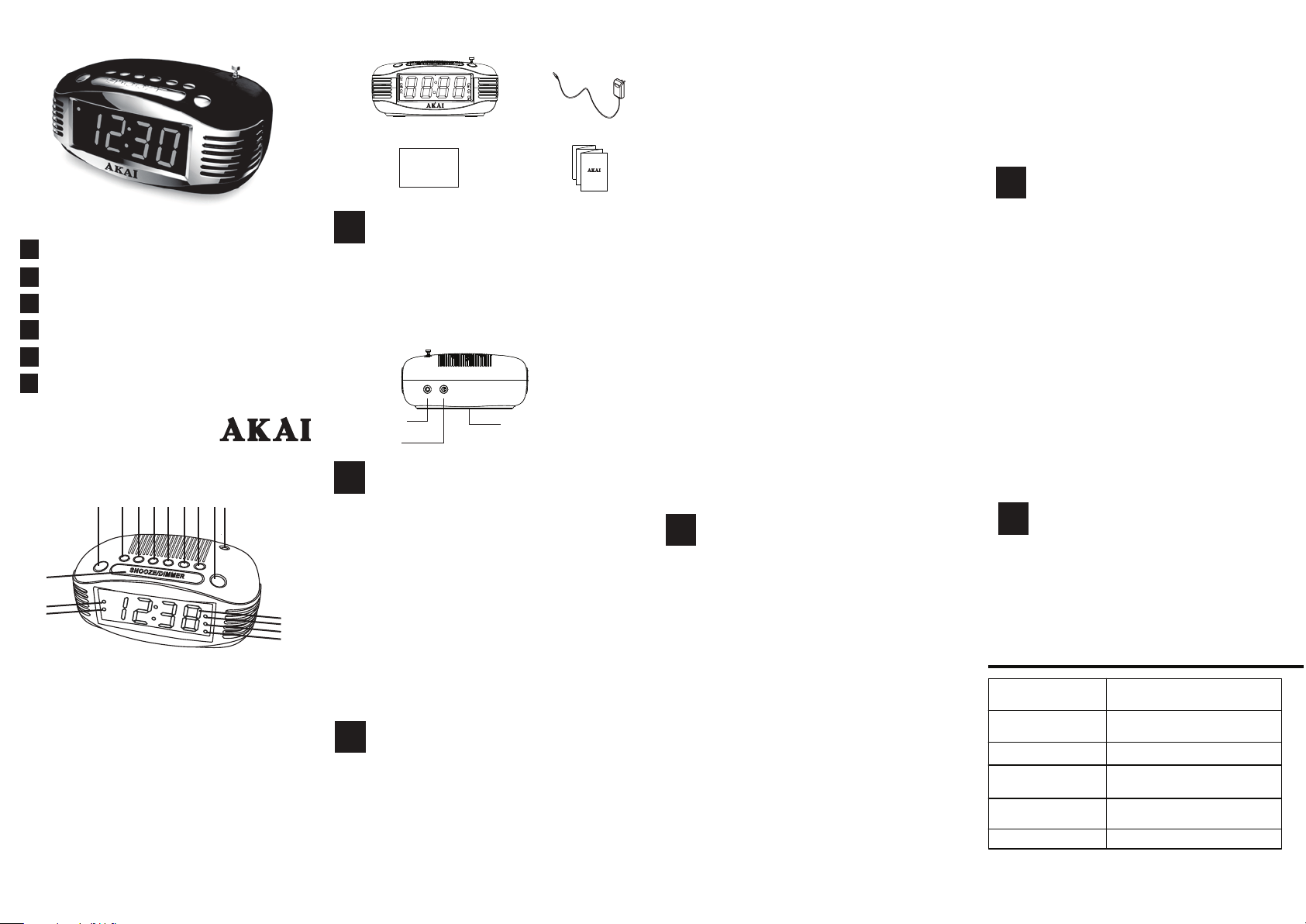
What’s in the box
1
Connect the power
CE1500 AM/FM PLL Alarm Clock Radio
Instruction Manual
Warranty Card
ADT Digital LLC
1.
Plug the small end of the supplied power adaptor into the
DC IN jack at the back of the unit. Plug the adaptor body
into the standard AC wall socket (AC 230V 50Hz).
2. Remove the battery door and insert 2 pieces of AAA 1.5V
battery (not included) into the battery compartment (be sure
to observe the polarity) and then replace the battery door.
AC Power Adatpor
6
Use the aux in
1. Plug one end of a standard 3.5mm stereo audio cable
into the earphone jack on your portable device and the
other end into the unit’s AUX IN jack.
2. Turn on the unit and play your portable device.
3. Turn off your portable device and unplug from the unit
after using.
Printed in China
CE1500_QSG_EN_V1.0
CE1500
Instruction Manual
1
2
3
4
Connect the power
Set the clock
Use the alarm
Use the radio
5
Use the sleep timer
Please read this instruction manual before
operating your unit.
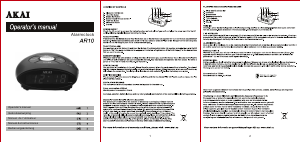
1. Wake to Radio Indicator (Alarm 1)
2. Wake to Buzzer Indicator (Alarm 1)
3. Snooze / Dimmer Button
4. AM/FM/AUX Button
5. Tune- / Hour Button
6. Tune+ / Minute Button
7. Radio Station / Memory / Time Set Button
8. Sleep Button
9. Volume- / Alarm1 Set Button
10. Volume+ / Alarm2 Set Button
11. Radio On-Off / Alarm Off Button
12. Antenna
13. LED Dispaly
14. Wake to Buzzer Indicator (Alarm 2)
15. Wake to Radio Indicator (Alarm 2)
16. Sleep Timer On Indicator
AM/FM PLL ALARM CLOCK RADIO
6
Use the aux in
TO SET SLEEP TIMER
1. You must switch off the radio before you set the sleep
timer.
2. Press the SLEEP button once to activate the sleep
timer to 90 minutes with “90” in the LED display and
the radio is turned on.
3. Press the SLEEP button repeatedly to adjust the
sleep timer to 80, 70, 60, 50, 40, 30, 20, 10 minutes
and then OFF. “OFF” means to cancel the sleep timer
and turn the radio off.
4. When the sleep timer is counting down, press the
SLEEP button to display the remaining time.
5. If you want to change the sleep timer, press the
SLEEP button repeatedly to the new sleep time.
TO CANCEL SLEEP TIMER
1. When the sleep timer is counting down, press the
SLEEP button repeatedly until “OFF” is displayed.
2. Alternatively, press the ON/OFF button once to turn
off the radio.
Battery compartment
(at the bottom of the unit)
DC IN jack
AUX IN jack
AUX IN
DC 6V
1
2
3
4 5 6 7 8 9 10 12
13
14
15
16
11


Join the conversation about this product
Here you can share what you think about the Akai CE1500 Alarm Clock Radio. If you have a question, first carefully read the manual. Requesting a manual can be done by using our contact form.
reply | This was helpful (0)